From a long-term servicing perspective, the following Windows 10 editions are currently available:
- Windows 10 Enterprise LTSC 2021 will be supported until January 12, 2027.
- Windows 10 IoT Enterprise LTSC 2021 – until January 13, 2032
Converting an existing Windows 10 Pro/Home/Enterprise edition to LTSC is not officially supported. In this case, Microsoft recommends completely reinstalling the operating system on the computer. However, there is a workaround to convert Windows 10 to Enterprise LTSC 2021 without reinstalling the system and without losing installed programs and data.
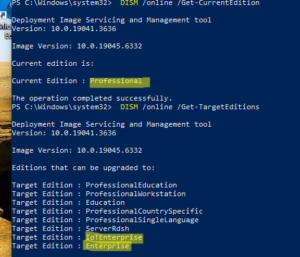
DISM /online /Get-CurrentEdition
DISM /online /Get-TargetEditions
However, this method doesn’t allow you to switch the operating system to the LTSC servicing channel. In our example, it’s possible to convert the Pro version to Windows 10 Enterprise or IoTEnterprise in the GAC, but not to LTSC.
To upgrade your Windows edition to LTSC, you’ll need the original installation ISO image en- us_windows_10_iot_enterprise_ltsc_2021_x64_dvd.iso . You can only obtain the ISO image with a Microsoft subscription, or use alternative sources (always verify the originality of the Windows ISO image using the checksum ).
Get-ItemProperty -Path "HKLM:\SOFTWARE\Microsoft\Windows NT\CurrentVersion"| select ProductName, DisplayVersion, CurrentBuild
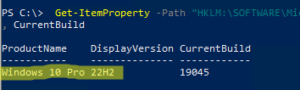
We have Windows 10 Pro 22 H2 (the latest build in the General Availability Channel, GAC) with an end of support date of October 14, 2025.
Also check your system language; it must match the language in the installation ISO image (for example, the Windows 10 IoT Enterprise LTSC image is only in English, en-US):
dism /online /get-intl
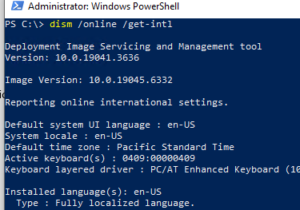
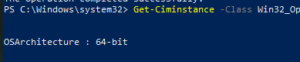
Check that the architecture (x86/x64) matches in the image:
Get-Ciminstance -Class Win32_OperatingSystem | Format-List OSArchitecture
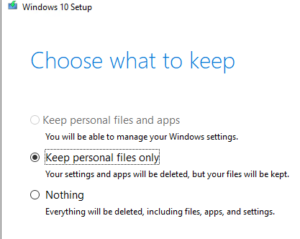
If you now try to mount the Windows 10 LTSC ISO image and run setup.exe from it, the option to upgrade the system while preserving installed applications and user data will be unavailable. You can select “Keep personal files only” or “Nothing .” Close the Windows 10 Setup window.
This limitation can be circumvented by adding the following registry entries, which will simulate the presence of the LTSC version installed on the computer. I’ll make the registry changes from PowerShell :
$regPath = "HKLM:\SOFTWARE\Microsoft\Windows NT\CurrentVersion"

Set-ItemProperty -Path $regPath -Name "EditionID" -Value "EnterpriseS"

Set-ItemProperty -Path $regPath -Name "ProductName" -Value "Windows 10 Enterprise LTSC"

Set-ItemProperty -Path $regPath -Name "ReleaseId" -Value "21H2"

Set-ItemProperty -Path $regPath -Name "DisplayVersion" -Value "21H2"

Set-ItemProperty -Path $regPath -Name "CurrentBuild" -Value "19044"

Set-ItemProperty -Path $regPath -Name "CurrentBuildNumber" -Value "19044"

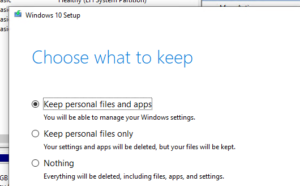
Now quickly run setup.exe from the ISO image and perform an in-place upgrade (the Keep personal files and apps option will be available).
When upgrading Windows 10, you will be prompted for a product key. Use the following official GVLKs for the LTSC edition, available at https://learn.microsoft.com/en-us/windows-server/get-started/kms-client-activation-keys?tabs=windows1110ltsc%2Cwindows81%2Cserver2025%2Cversion1803
- For Windows 10 Enterprise LTSC 2021 —
M7XTQ-FN8P6-TTKYV-9D4CC-J462D - For Windows 10 IoT Enterprise LTSC 2021 –
QPM6N-7J2WJ-P88HH-P3YRH-YY74H
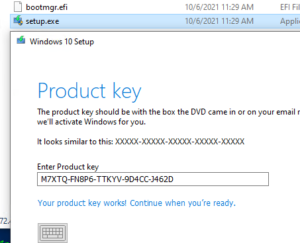
Wait for the in-place upgrade of Windows 10 to LTSC to complete (this may take a couple of hours).
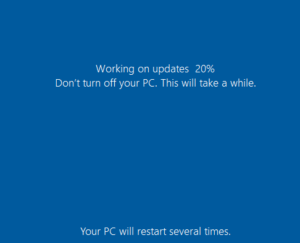
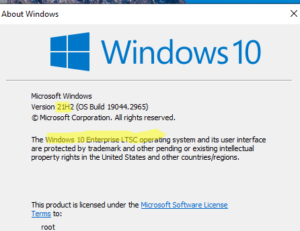
Once the update is complete, check that the version has changed to Windows 10 Enterprise LTSC with a build based on 21H2.
winver
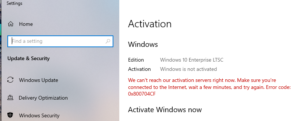
After updating, check your Windows activation status . As you can see, Windows activation has failed. Error 0x800704CF is displayed , indicating that a valid license was not found.
To activate Windows, you can use an officially obtained LTSC key. LTSC also supports KMS activation (including via a Linux KMS server ). The IoT version of Windows does not support KMS activation; only digital activation (hwid) is possible (access option in MAS activation scripts).
There is also another way to convert your existing Windows 10 Pro/Home/Enterprise installation to IoT Enterprise LTSC edition without reinstalling.
- Mount the installation ISO image from LTSC
- Open Command Prompt with Administrator privileges
- Perform:
mkdir c:\mnt - Mount the install.WIM image from the installation disk to a folder (replace the assigned drive letter
D:with your own):
dism /Mount-Wim /WimFile:D:\sources\install.wim /index:2 /ReadOnly /MountDir:c:\mnt - Copy files from the image:
xcopy c:\mnt\Windows\system32\spp\tokens\skus\IoTEnterpriseS c:\windows\system32\spp\tokens\skus\IoTEnterpriseS /i - Unmount the WIM file:
dism /Unmount-Wim /MountDir:c:\mnt /Discard
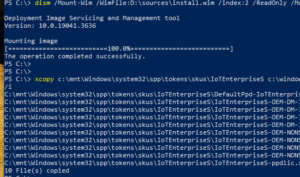
- Resetting license information in the system:
cscript c:\windows\system32\slmgr.vbs /rilcLicense files re-installed successfully .
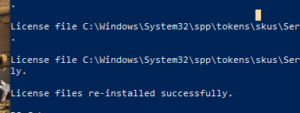
- Install the product key for IoT LTSC:
cscript c:\windows\system32\slmgr.vbs /ipk QPM6N-7J2WJ-P88HH-P3YRH-YY74H
Restart your computer and verify that your Windows version has changed to Windows 10 IoT Enterprise LTSC, which will receive security updates until January 2032.
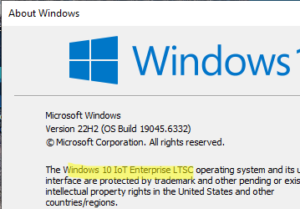
As we mentioned earlier, activating IoT Enterprise LTSC via KMS is not possible:
This product doesn't support KMS activation.
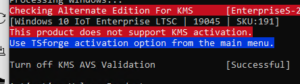
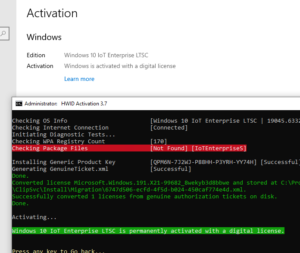
However, it can be activated using a digital license. Specifically, I successfully activated IoT LTSC using the HWID activation option in the MAS script:
irm https://get.activated.win | iex