
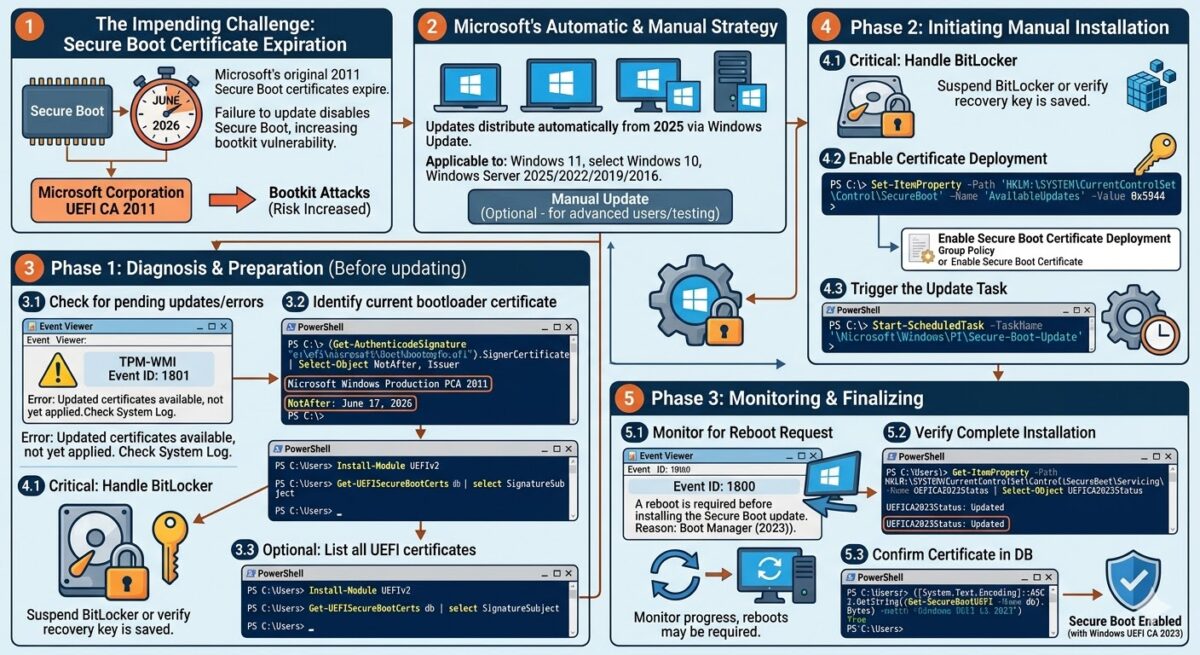
Secure Boot is a security mechanism in the Unified Extensible Firmware Interface (UEFI) environment that protects against loading unsigned or malicious code before the operating system is initialized. The original Secure Boot certificates from Microsoft, issued in 2011 ( Microsoft Corporation UEFI CA 2011 ), will expire starting in June 2026, which threatens to disable Secure Boot protection and increases the risk of successful bootkit attacks.
To replace Secure Boot certificates expiring in 2026, Microsoft began distributing updates to automatically replace expiring UEFI Secure Boot certificates starting in 2025.
In this article, we’ll show you how to manually initiate an update to Secure Boot certificates and the Windows bootloader signed by Windows CA certificates in 2023, without waiting for them to be automatically installed.
Microsoft automatically delivers updates with the new certificates to all computers running supported versions of Windows with UEFI Secure Boot enabled. This includes all versions of Windows 11, LTSC editions of Windows 10, and devices running Windows 10 22H2 that are participating in the Extended Security Update (ESU) program, as well as Windows Server 2025, 2022, 2019, and 2016.
Error: Secure Boot certificates have been updated, but are not yet applied in Windows
Starting in January 2026, Microsoft began distributing new Secure Boot certificates and a new signed bootloader to Windows 11 devices via Windows Update. So, if you regularly install cumulative updates, the certificates are already copied to your device, but they are not activated by default.
You can check whether the new UEFI Secure Boot certificates have been implemented on your computer using the command:
[System.Text.Encoding]::ASCII.GetString((Get-SecureBootUEFI -Name db).Bytes) -match "Windows UEFI CA 2023"

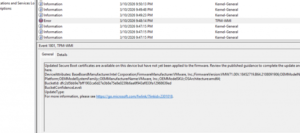
If updates have been delivered to your computer that contain new Secure Boot certificates but have not yet been applied, you will see an error from the TPM-WMI source with error code 1801 in the System log :
Updated Secure Boot certificates are available on this device but have not yet been applied to the firmware. Review the published guidance to complete the update and maintain full protection. This device signature information is included here.
DeviceAttributes: BaseBoardManufacturer: Intel Corporation;FirmwareManufacturer: здесь будет информацию о прошивке UEFIBucketId: dfc2d5bb9e7bff1902ca6d27e3b8e75e8e0239b6aa6f943af833fa12968639ed BucketConfidenceLevel: UpdateType: For more information, please see https://go.microsoft.com/fwlink/?linkid=2301018
Microsoft will initiate automatic installation of certificates on compatible devices at some point (before June 2026).
What happens if I don’t update my Windows UEFI CA 2023 certificates?
If your computer doesn’t receive an update for some reason, or the certificates you’re using aren’t replaced before the previous ones expire, this won’t cause problems booting Windows or preventing you from using devices with old certificates. Only the Secure Boot mechanism will stop working, leaving your computers vulnerable to bootkit infections.
Updates with new certificates and signed files for the Secure Boot environment are downloaded via Windows Update to the C:\Windows\system32\SecureBootUpdates .
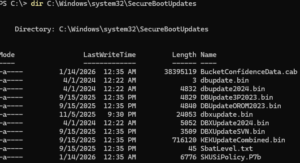
According to Microsoft, most devices will automatically receive and install new Secure Boot certificates via Windows Update. This will all be seamless to users.
However, some computer models (mostly older devices manufactured before 2023) require a manual UEFI firmware update beforehand. Check the vendor’s website to see if your device requires a UEFI firmware update before implementing Windows UEFI CA 2023 certificates.
Let’s check which certificate signs the Windows bootloader. On UEFI systems, this is the bootmgfw. efi file, which is stored on the EFI system partition (by default, this partition isn’t assigned a drive letter, but assigning one is easy—see the article on the EFI boot partition in Windows ).
Using PowerShell (or the sigcheck utility ), we extract information about the certificate that signed the bootloader file:
(Get-AuthenticodeSignature "e:\efi\microsoft\Boot\bootmgfw.efi").SignerCertificate | Select-Object NotAfter, Issuer
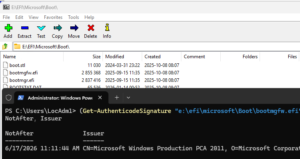
As you can see, this is a Microsoft Windows Production PCA 2011 certificate that expires on June 17, 2026.
You can also use the PowerShell module from the PSGallery repository to obtain extended information about installed certificates in UEFI.
You can install the PowerShell module from the online repository (it is also possible to install the PowerShell module offline )
Install-Module UEFIv2
List installed certificates:
Get-UEFISecureBootCerts db | select SignatureSubject
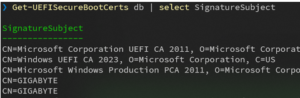
After installing security updates released after October 2025, Microsoft added several registry keys to control the update status of Secure Boot certificates.
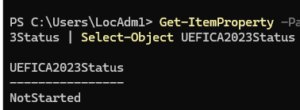
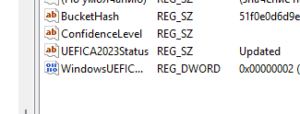
The current certificate update status can be found in the UEFICA2023Status key :
Get-ItemProperty -Path HKLM:\SYSTEM\CurrentControlSet\Control\SecureBoot\Servicing\ -Name UEFICA2023Status | Select-Object UEFICA2023Status
Possible values:
- NotStarted – the update has not started
- InProgress – update started or completed, or adding a certificate to UEFI or updating the bootloader
- Updated – the update is complete. Both the certificates and the bootloader signature have been updated.
Starting the installation of Secure Boot certificates in Windows
You can manually initiate a Secure Boot certificate update on your Windows device without waiting for it to be automatically deployed. This may be useful for developers and system administrators who want to test specialized software or hardware that may be affected by the Windows UEFI CA 2023 certificate and bootloader update.
To allow installation of new Secure Boot certificates, change the value of the AvailableUpdates parameter to 0x5944.
Set-ItemProperty -Path ‘HKLM:\SYSTEM\CurrentControlSet\Control\SecureBoot’ -Name ‘AvailableUpdates’ -Value 0x5944
You can also start installing certificates using the Enable Secure Boot Certificate Deployment GPO setting in the Computer Configuration -> Administrative Templates -> Windows Components -> Secure Boot section (this setting is available in the new ADMX group policy templates for Windows 11).
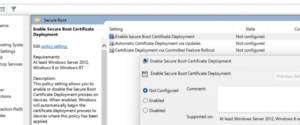
After this, run the Secure-Boot-Update scheduler task. This will initiate a chain of tasks to replace certificates in UEFI and update the Windows bootloader.
Start-ScheduledTask -TaskName ‘\Microsoft\Windows\PI\Secure-Boot-Update’

We check in Event Viewer when the certificate update is complete based on TPM-WMI events in the System log. In our case, the computer requires a reboot:
Event ID: 1800:
A reboot is required before installing the Secure Boot update. Reason: Boot Manager (2023)).
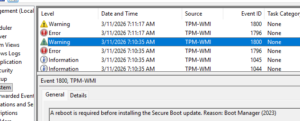
After a reboot, you’ll likely need to run the Secure-Boot-Update task again. Monitor the progress using events in Event Viewer. After a while, another reboot will be required.
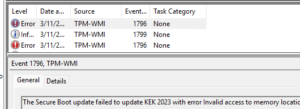
When updating, you may encounter an error in the logs:
TPM-WMI:1796
The Secure Boot update failed to update KEK 2023 with error Invalid access to memory location
This indicates that your UEFI firmware is rejecting the 2023 Secure Boot KEK certificates. This is common for virtual machines and older physical machines. You will need to either update the virtual hardware version, the UEFI firmware, or manually write the certificates to the UEFI.
The link provides an example of manually updating the Platform Key (PK) in the Secure Boot database for VMware ESXi virtual machines.
https://knowledge.broadcom.com/external/article/423919/manual-update-of-secure-boot-variables-i.html
For a full list of possible TPM-WMI errors that may occur when distributing new Secure Boot certificates, see this Microsoft article: https://support.microsoft.com/en-gb/topic/secure-boot-db-and-dbx-variable-update-events-37e47cf8-608b-4a87-8175-bdead630eb69
Once the certificate update is complete, verify that the UEFICA2023Status value has changed to Updated.
We check for the presence of the Windows UEFI CA 2023 certificate in the active Secure Boot DB database of authorized signatures:
([System.Text.Encoding]::ASCII.GetString((Get-SecureBootUEFI db).bytes) -match 'Windows UEFI CA 2023')