
A DBMS is a database management system. The first DBMSs appeared back in the 1970s, and today they are used by every second company, from small online stores to Facebook*, Google, and Amazon.
To manage databases and find the necessary information, queries are written in specialized languages. The most popular of these is SQL (from Structured Query Language).
What are DBMSs for?
Using a DBMS, you can create, merge, and delete information in databases, grant access to them to specific users, and protect them from hacking.
Main functions of the DBMS:
● Database creation, modification, deletion, and merging based on specific criteria.
● Data storage, including large data sets, in a structured manner and format.
● Data protection from hacking and unwanted changes using distributed access: when different user groups have access to different volumes and segments of data.
● Data download and sorting based on specified filters using SQL queries.
● Database integrity maintenance, backup, and disaster recovery.
Database management systems are needed by specialists who work with data in IT:
● Application and website developers to store and process data about users, transactions, and directory contents.
For example, when developing an app for a fitness club, user data is stored in a huge Excel spreadsheet, including names, dates of birth, membership details, training bookings and cancellations, and so on. If the database is organized correctly, it will be much easier to share the app when opening a new branch of the fitness club or, if the app is blocked, to create a new one without losing customer data, and therefore without losing money for the business.
● Data analysts and data science specialists can extract relevant data for research, generate reports, and make forecasts. The system on any smartphone can recognize people’s faces in photographs and group images. This is achieved by training computers on millions of images, the data for which is stored in a database.
● DevOps engineers to automate the process of product development and implementation based on data and reports. Aggregating and analyzing user reports manually is virtually impossible, but DBMSs make it possible to automate, for example, the development of a new software version or collecting error data during the development of a new application.
What are database management systems made of?
Here are the main elements found in every DBMS and their functions:
● Kernel. This is the foundation of the entire system, responsible for storing and processing databases. All changes are recorded in the kernel: additions, deletions, or corrections to entire databases and individual cells.
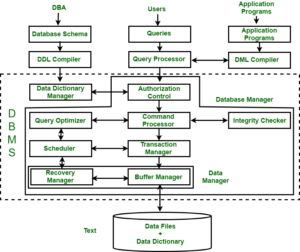
● Processor, or compiler. Processes database queries in internal languages and SQL, converting them into the required commands and transmitting the results.
● Software tools, or utilities. With their help, users enter queries, and database administrators configure access and other parameters.
● Databases. Where data is stored, organized specially, sometimes in an encrypted form. If these are relational databases, the data is presented in the form of tables linked to each other. If they are object databases, the data is presented in the form of objects: blocks of information with specific properties and parameters.
For example, to create a menu for your own coffee shop, you first need to research what your competitors sell and where they order their products from, and then gather all the data in one place. The resulting databases will be:
— With drinks and their ingredients: for example, an almond cappuccino consists of coffee, milk, and almond syrup.
— With suppliers who supply products and consumables: cups, straws, and napkins.
If these databases are structured properly, it will be easy to calculate the cost of a coconut latte, who is more profitable to source raw materials and consumables from, and what price to sell the finished coffee for.
Main types of DBMS
Database storage:
● Local.
All elements of the system and databases are located on a single server, usually within the company.
● Distributed.
Elements are located on different servers, including cloud servers.
Many modern DBMSs support both local and distributed use or allow you to connect additional modules for distributed access.
Storage and processing of data and requests:
● Client-server.
The DBMS and databases are located on a single server, which is accessed by different users. Data can be accessed through this server from any computer; no special software is required. For example, if this is a database for an online store where customers search for different products.
Examples: Firebird, MS SQL Server, Oracle, PostgreSQL.
● File-server.
Databases are stored on a single file server, and the DBMS is stored on each device from which database queries are sent. For a user to access the data, the DBMS must be installed and configured on their computer. Such systems are used for local corporate services: for example, CRM, which stores data about the company’s clients, and document management.
Examples: Microsoft Access, Paradox, dBase, FoxPro, Visual FoxPro.
● Embedded.
Local DBMSs that are embedded into an application as a separate module and are used to manage data only within it.
Examples: OpenEdge, SQLite, Microsoft SQL Server Compact.
● DBMS with SQL support – the most common and universal language for structured queries to databases.
Examples: MySQL, Microsoft SQL Server, PostgreSQL.
● NoSQL — non-relational DBMSs that support other query languages based on programming languages, such as JavaScript. Such DBMSs are used where it is necessary to work with big data or document archives with a huge number of different relationships.
Examples: Oracle NoSQL Database.
● Relational.
Data is presented in tables linked by cross-cutting parameters. Each row has a unique identifier, or key. This makes it easy to find the data you need and link it together.
Examples: MySQL, PostgreSQL.
● Key-value.
Those that use a unique two-part identifier—a key and a value—to store data, which is assigned to each unit of data.
Examples: Redis, Memcached.
● Document.
DBMS for databases that store documents with structured text and special syntax. These can be archives, catalogs, or action logs, or logs for websites and applications.
Examples: Amazon DocumentDB, CouchDB, MongoDB.
● Graph DBMSs.
DBMSs that work with databases where the units of information are relationships similar to those between relatives or people with similar interests. Such databases are often used in social networks or recommendation services.
Examples: Amazon Neptune, Neo4j, InfoGrid.
● Columnar .
These DBMS are similar to relational DBMS, except that the data is presented in the form of columns, each of which is analogous to a separate table.
Examples: SAP IQ, Google Bigtable, Vertica.
Examples of modern DBMS
A client-server relational DBMS that offers significant functionality and performance, yet is available free of charge. It is also suitable for large-scale projects with large data sets and high workloads.
SQL is used as the primary query language, but the DBMS also supports extensions based on programming languages: PL/Perl, PL/Python, and PL/Java. One of the main advantages of PostgreSQL is that it has no limits on database size or the number of records in tables.
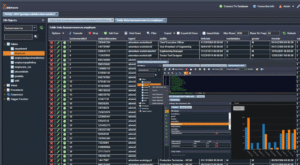 PostgreSQL DBMS interface
In the “SQL for Data and Analytics” course, students learn to solve work-related problems using popular DBMSs to make data-driven decisions and structure them in large datasets.
A client-server relational DBMS suitable for medium and small teams or projects. This database program features a simple and user-friendly interface and is freely available. It supports a wide range of table formats and is constantly expanding its capabilities.
The database operates online at high speed and can store up to 50 million data units. However, its functionality is still limited compared to PostgreSQL. MySQL is used to store and manage data for websites and online stores, including Facebook*, Twitter, Alibaba, and Wikipedia. It can also work in combination with other popular databases.
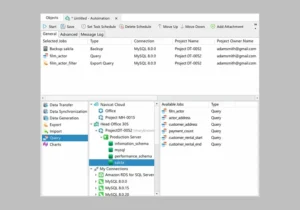
A relational DBMS, the extended paid version of which is used by large companies. The free Express version is suitable for small projects with data volumes up to 10 GB.
The system automates routine tasks, such as resizing a file or managing memory. It’s convenient for storing complex data and quickly finding what you need with a simple search.
The system can import data from other Microsoft programs (such as Access and Excel) and make changes online. The T-SQL (Transact-SQL) extension is used for queries in the DBMS.
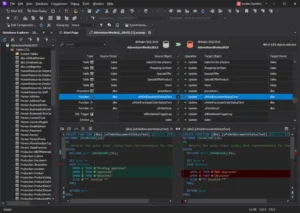 MS SQL Server Interface
A NoSQL document management system where data is stored as JSON (JavaScript Object Notation) files, i.e., text documents in a JavaScript-based format. The DBMS supports JSON as a query language instead of SQL.
Instead of tables, as is common in relational DBMSs, MongoDB stores data as collections, or groups of documents. It’s a free, open-source database program that can store any data as long as it’s converted to JSON format. These properties make it virtually universal and easily scalable.
This DBMS is suitable for working with big data of various types and from a variety of sources. Data is automatically distributed across different databases to optimize workload and speed up query processing. MongoDB is used to store local data by companies such as Google, Facebook*, Twitter, IBM, Forbes, and many online stores.
 MongoDB interface
A compact DBMS suitable for small projects. It consists of a single file and is integrated into the IT infrastructure as a library, eliminating the need for servers or special services. All databases are stored on a single device.
SQLite is suitable for small websites and applications with limited traffic and data volume, as well as services that require reading or saving files to disk. The DBMS runs on computers, smartphones, TVs, set-top boxes, and drones, requiring no administration or support. It uses C as the query language.
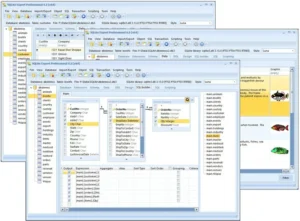
What you need to remember about DBMS
● Using a DBMS, you can collect, store, protect, and manage databases. You can also provide distributed access, so that different groups of users have access to different volumes of data and operations with it.
● DBMS are needed by everyone who works with data: online stores, banks, marketers, researchers, game and application developers.
● To work with a DBMS, you need to master the basics of a query language (the most popular and universal is SQL). For some DBMSs, programming languages such as JavaScript, Python, and C++ are also useful.
● There are different types and classifications of DBMS: by database structure, file format, query language, and system deployment method.
● There are dozens of different DBMSs on the market, but no more than ten are the most popular. Among them, you can choose the one that meets your needs, requirements, and budget: project scale and data volume, installation and hosting method, and availability (paid or free). The larger and more expensive the DBMS, the more capabilities and the higher the level of data protection it offers.