BUZZBONGO TECH GEEKS

YOUR TECH GUIDES
Which analytics systems should you choose for your business?

Analytics systems help businesses collect, structure, and analyze data. This saves specialists time and companies money. We explain in detail the types of systems and how to choose them.

Why does a business need analytics systems?

Data collection and analysis are essential for the efficient operation of any business. Information helps make informed decisions, reduce costs, and increase revenue. However, many companies face challenges processing large volumes of data. Business intelligence (BI) systems help solve this problem. Let’s take a closer look at how BI systems help businesses.

Automated information processing. Systems handle information processing and report preparation. Previously, it was necessary to manually collect data from various sources, combine it, select the required data, and output it into a single document. Now, a BI system can do this work.

Efficiency. Previously, generating a report could take weeks; now it can be done instantly. For example, the system can display a company’s financial results in seconds.

Building business development models and scenarios. A BI system can calculate company indicators, analyze them, and generate hypotheses.
For example, in retail, food companies use consumer behavior analysis to personalize offers to customers. In banking, it is used to manage loan portfolios and protect against fraud. Banks analyze borrowers’ credit histories, calculate the probability of loan default, and thereby prevent potential losses.

Another important area of ​​analytics is pricing. A business analytics system can determine the optimal price for a product or service, taking into account various factors: competition, seasonality, demand elasticity, and other parameters.

Main types of analytics systems

There are four main types of analytics systems.

  1. Descriptive analytics is a holistic view of the current state of affairs. The primary goal of descriptive systems is to describe a past event. Such systems answer the question, “What happened?” or “What events occurred?”
    Consider standard website traffic statistics: sales for a specific period or order volume trends. The user receives simple information about past events, but no explanations of the causes, conclusions, or next steps are offered.
  2. Diagnostic analytics investigates the causes of events, looking for connections between factors and results. It answers the question, “Why did this happen?” For example, diagnostic analytics helps identify the factors behind a sharp decline in sales: decreased demand and product quality, price changes, competitor actions, or external circumstances. Users of diagnostic analytics receive a detailed picture of events, the exact cause, and conclusions that help prevent the recurrence of negative events or replicate positive ones. A drawback of the diagnostic approach is its exclusive focus on the past.
  3.  Predictive analytics builds forecasts based on historical data and statistics. It answers the question, “What will happen next?” Using machine learning and statistical analysis, predictive systems can forecast probable events, consumer behavior, market fluctuations, and much more. A typical application scenario is forecasting sales volumes or anticipating loan defaults. The advantage of predictive systems is their ability to prevent undesirable consequences and prepare responses in advance.
  4.  Prescriptive analytics suggests the optimal solution to a problem or suggests next steps. It answers the question “What to do next?” These systems recommend actions to users to achieve a goal.
    Examples of prescriptive analytics include a product recommendation system for online stores or a system for selecting the optimal maintenance schedule for industrial equipment.

All analytics systems are most often used in tandem. For example, a single system might combine predictive and prescriptive analytics, or descriptive and diagnostic. We’ll discuss how to choose the right system for your business below.

Popular analytics systems on the market

The business intelligence (BI) and analytics market in the USA is highly competitive, currently dominated by a few major players that integrate deeply with existing cloud and productivity ecosystems. In 2026, the focus has shifted heavily toward AI-driven “agentic” analytics, where tools can not only visualize data but also suggest actions using natural language.

Here are five of the most popular BI systems available for businesses in the USA:

1. Microsoft Power BI

Power BI remains the market leader due to its seamless integration with the Microsoft 365 ecosystem (Excel, Teams, and Azure). It is highly favored for its affordability and “Copilot” AI features that allow users to generate reports using plain English.

  • Best For: Businesses already using Microsoft products and those looking for a balance between self-service and enterprise-level reporting.

  • Key Feature: High-speed data modeling and a massive library of third-party connectors.

  • Link: Power BI Official Site

2. Tableau (by Salesforce)

Tableau is widely considered the gold standard for data visualization. It is designed for deep exploratory analysis and “data storytelling,” allowing users to create complex, beautiful, and highly interactive dashboards.

  • Best For: Data analysts and organizations that prioritize high-quality visual analytics and large-scale data exploration.

  • Key Feature: “Tableau Next,” an agentic AI platform that helps turn insights into autonomous business actions.

  • Link: Tableau Official Site

3. Google Looker / Looker Studio

Google offers two tiers: Looker Studio (a user-friendly, often free tool for quick reporting) and Looker (an enterprise-grade platform). Being part of the Google Cloud, it excels in real-time data modeling and collaborative analytics.

  • Best For: Companies heavily invested in the Google Cloud Platform (GCP) or those needing a centralized, governed data model.

  • Key Feature: LookML, a powerful modeling language that ensures everyone in the company is using the same definitions for their metrics.

  • Link: Looker Studio Site

4. Qlik Sense

Qlik is famous for its Associative Engine, which allows users to explore data relationships in any direction rather than being restricted to pre-defined hierarchies. It is a top choice for organizations that need flexible, “unstructured” data discovery.

  • Best For: Enterprises needing powerful in-memory processing and AI-driven insights that go beyond simple dashboards.

  • Key Feature: “Insight Advisor,” an AI assistant that automatically suggests the best visualizations for your datasets.

  • Link: Qlik Official Site

5. Sisense

Sisense specializes in embedded analytics, meaning it is built specifically to be integrated directly into other software applications. If you see an analytics dashboard inside a professional app you use, there is a high chance it is powered by Sisense.

  • Best For: Software developers and SaaS companies that want to provide analytics to their own customers without building the tools from scratch.

  • Key Feature: “Compose SDK,” which allows developers to build AI-powered, conversational analytics directly into their own products.

  • Link: Sisense Official Site

Comparison Summary

System Primary Strength Ideal User
Power BI Ecosystem Integration General Business Users
Tableau Visual Design & Depth Data Scientists/Analysts
Looker Data Governance Cloud-Native Enterprises
Qlik Sense Flexible Data Discovery Power Users
Sisense Custom Embedding Product/App Developers

Criteria for choosing an analytics system for business

When choosing the right analytics system, you need to consider everything from the company’s size to the ability to integrate with CRM. Let’s discuss this in more detail.

  • Goal setting. It’s important to understand why a business needs an analytics system and what tasks it should accomplish.
    For example, the goal might be to increase sales and boost customer loyalty. In this case, turnover, average purchases, and repeat purchase rate are important metrics.

Below is a demo analysis of a hypothetical consumer electronics manufacturer, “NovaTech Dynamics.” The analysis demonstrates how typical business data is used to identify bottlenecks, opportunities, and strategic risks.

Data Analysis: NovaTech Dynamics — Supply and Demand Balance

1. Executive Summary

This report analyzes the supply and demand landscape for NovaTech Dynamics for the period FY2023 – FY2024.

NovaTech specializes in smart home devices. We observed strong market demand driven by high consumer sensitivity to energy efficiency. However, the company faced significant supply chain rigidity, primarily due to component shortages and long lead times for semiconductors.

This imbalance resulted in high stockout rates during peak periods and limited the company’s ability to capture potential market share.

2. Demand Analysis: “What does the market want?”

Demand analysis seeks to understand customer desire, market size, and purchasing behavior (SBA 2025).

Key Demand Metrics (FY2023-FY2024)

Metric FY2023 FY2024 Change Interpretation
Total Orders (Units) 850,000 1,020,000 +20% Strong underlying growth.
Forecast Accuracy (FA) 78% 81% +3% Improving, but still below the industry benchmark of 85% (Intelichain 2026).
Mean Absolute Percentage Error (MAPE) 22% 19% -3% (Imp.) Forecasts are becoming more reliable.
Seasonality Index (Q4) 1.6 1.7 +0.1 Q4 continues to dominate sales due to holiday spending.

Insights from Demand Data

  • High Growth Trajectory: The 20% growth in total orders suggests strong consumer interest and a “desire for the product” (SBA 2025).

  • Volatile Peak Demand: The rising Seasonality Index indicates increasingly volatile fourth quarters. This puts extreme pressure on the supply chain to perform during a narrow window (Coupa 2024).

3. Supply Analysis: “What can we deliver?”

Supply represents the quantity of a product available to consumers (Engineering Industries eXcellence). It depends on manufacturing capacity, inventory, and logistics efficiency.

Key Supply & Operational Metrics

Metric FY2023 FY2024 Status Impact
Manufacturing Capacity Utilization 94% 96% CRITICAL Production is almost at its ceiling. There is minimal “window of opportunity” to scale quickly if demand spikes further (SBA 2025).
Supplier Lead Time (Semi-conductors) 95 Days 120 Days WORSE Increased lead times create uncertainty and increase the risk of stockouts (Imperia SCM).
Inventory Turnover Ratio (ITR) 6.2 5.5 SLOWER Although sales are up, inventory is moving more slowly, suggesting an imbalance between components and finished goods (Intelichain 2026).
Service Level (SL) 88% 85% WORSE Failed to meet promised timelines for 15% of demand, indicating poor customer service due to stockouts (Imperia SCM).

Insights from Supply Data

  • Supplier Fragility: The extension of supplier lead times for semiconductors (from 95 to 120 days) is the main external bottleneck. Such supply chain disruptions often lead to direct revenue loss when customers turn to competitors (Iconic).

  • Operational Strain: 96% capacity utilization means any minor disruption (machine failure, labor shortage) causes an immediate bottleneck in the production plan (Engineering Industries eXcellence; SAP 2025).

4. Integrated Analysis: The “Supply-Demand Gap.”

The most critical insights appear when supply data is juxtaposed with demand data.

KPIs of the Imbalance

Metric FY2023 FY2024 Interpretation
Stockout Rate 8% 12% HIGH RISK. We are unable to meet available demand when needed (Intelichain 2026). This directly results in lost sales opportunities (Iconic).
Backorder Rate 5% 9% Increased unfulfilled orders put significant strain on customer satisfaction and relationships (SAP 2025; Imperia SCM).
“Bullwhip Effect” Ratio 1.15 1.25 VOLATILE. Demand distortion is traveling upstream. Small changes in customer demand are causing massive spikes in component orders (CIPS).

Revenue Impact Modeling (Demo Calculation)

Using data from the Integrated Analysis, we can estimate the financial impact of the supply shortfall.

  • Total Missed Opportunities (Stockouts + Backorders): 12% + 9% = 21% of Orders.

  • Unfulfilled Orders (Units): 21% of 1,020,000 = ~214,200 Units.

  • Average Selling Price (ASP): $150.

  • Estimated Revenue Loss: 214,200 units * $150/unit = $32.1 Million.

This loss is exacerbated by increased costs associated with expediting shipments to meet deadlines during shortages (Iconic).

5. Strategic Recommendations

The data analysis clearly shows that NovaTech Dynamics is Supply-Constrained. Our inability to scale supply to match demand is hindering growth and profitability.

I. Supply Chain Resilience (Long-term)

  • Supplier Diversification: Move away from single-source reliance for semiconductors to reduce lead time volatility and geopolitical risk (Iconic).

  • Strategic Overstocking: To handle 120-day lead times, implement a policy of holding “safety stock” of high-risk components (semiconductors) rather than finished goods. While this increases carrying costs, it is cheaper than losing $32M in revenue (Iconic).

II. Demand Planning Optimization (Short-term)

  • Implement Active Forecasting: Transition from “passive” historical-data forecasting to “active” forecasting that includes market signals such as competitor pricing and planned marketing rushes (Haslam/UTK 2021; CIPS).

  • Improve Visibility: Integrate ERP systems with key suppliers to allow real-time tracking of component arrival times (TechAvidus).

III. Capacity Investment

  • Utilize Data for Automation: Given 96% utilization, the company must invest in automation to increase frontline delivery and reduce operational downtime (Pragmatic Institute). This will shift the capacity ceiling higher to allow for growth.


  • Company size. Small businesses will benefit from a lightweight and affordable cloud solution, such as Yandex DataLens. Larger organizations will need a scalable system capable of processing large volumes of data, such as Looker Studio.
  • Integration with other resources. Consider the ability of the selected system to integrate with other systems, such as CRM and ERP. Choose a system that supports the maximum number of protocols and data transfer standards (JDBC/ODBC, REST API, etc.).
  • Budget and feasibility. Determine your financial limits. Small companies typically focus on inexpensive cloud solutions with basic analytics functionality. Large businesses are more focused on system capabilities than cost.

Additionally, use demo versions before purchasing to ensure sufficient functionality. Review reviews and implementation cases of similar systems in your niche. Choose providers who can support your company through all stages of system implementation. We’ll cover these steps below.

How to start implementing an analytics system in your business

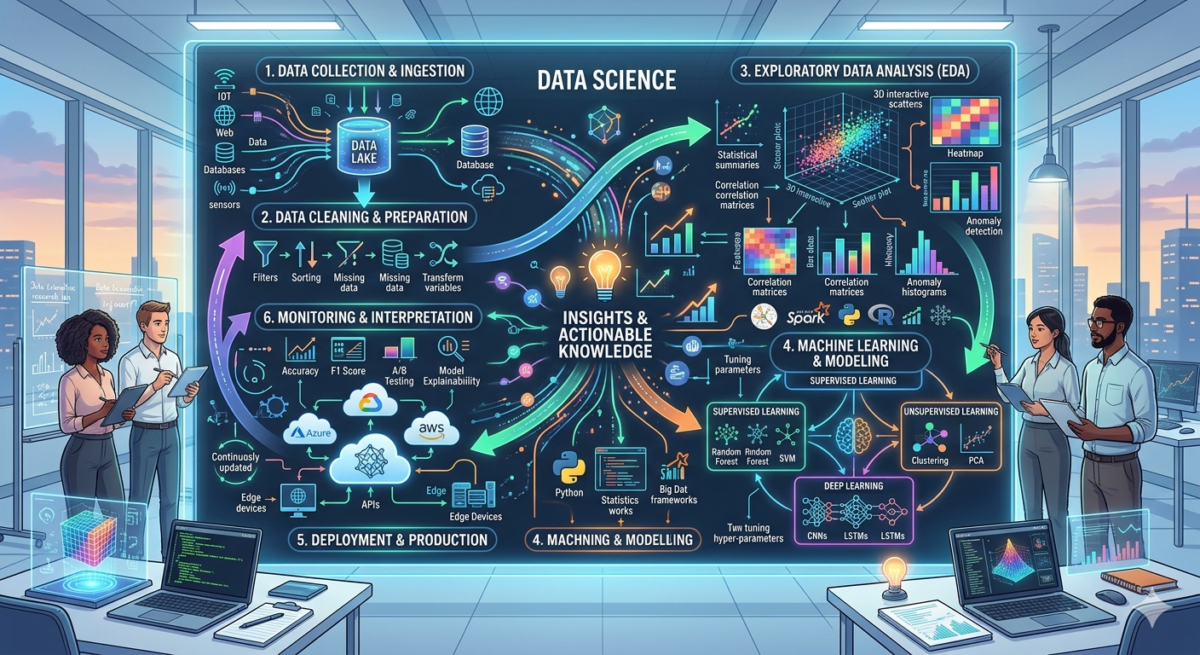
Implementing a BI system can take months or even years. The process consists of six stages:

1. Data collection. Users specify their needs: reports, dashboards, metrics, and update frequency.
2. Data source search. The team determines where the BI system receives data: CRM, ERP, etc. The data is verified for accuracy and configured if necessary.
3. System selection. The BI analyst selects a ready-made solution or initiates the development of a custom system.
4. System configuration. The data warehouse is configured, integration with sources is performed, and the interface is created.
5. System testing. The data is verified for accuracy. Testers or users can perform testing.
6. User training. After system implementation, the integrator conducts staff training. Users can choose the training format: in person or through instructions, videos, or webinars.