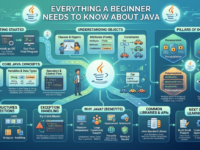
Everything a Beginner Needs to Know About Java
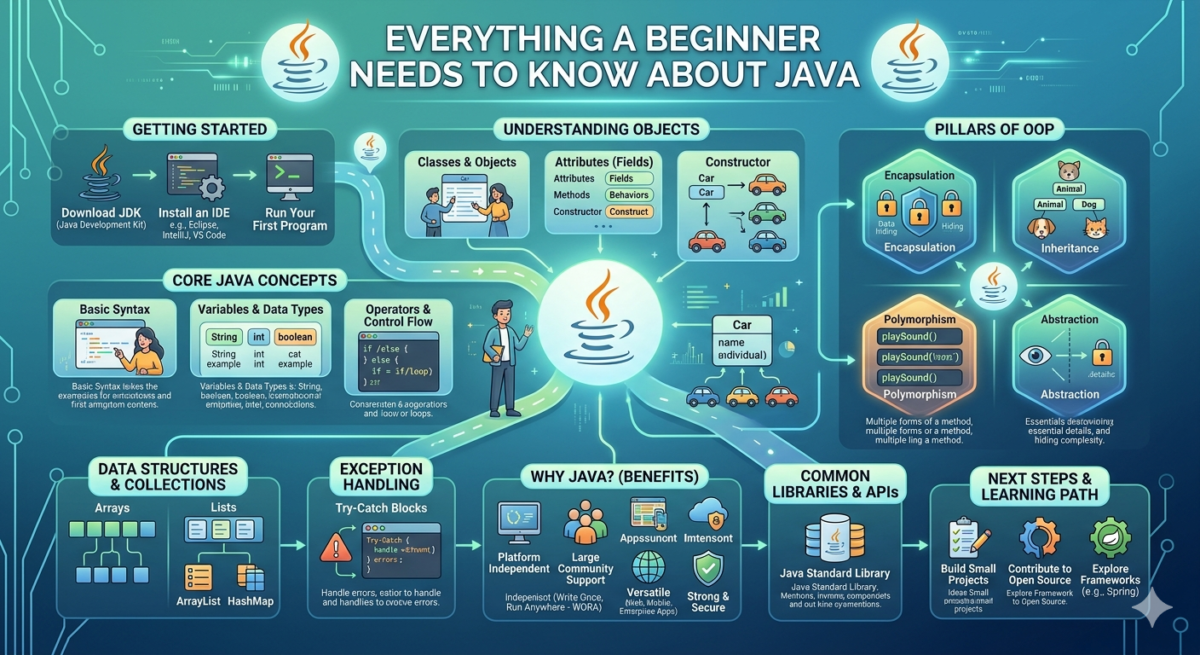
Java is used when a reliable and time-tested programming language is needed. For example, in a banking application. Even for a small bank, implementing functions such as transfers, card payments, and balance display is a significant undertaking. While the client taps the screen four times, the server processes ten thousand lines of Java code.
But this doesn’t mean Java is only for banks: it can be used to create Android apps, PC programs, and much more. In this article, we’ll explain what Java is, how it differs from other languages, and when it’s used.
Terminology: Understanding Java Properties
Java has two properties that determine what tasks it can handle. These properties have complex names, but it’s worth understanding them before moving on.
Java is an object-oriented programming language (OOP). All interaction occurs through objects. This is generally similar to what happens in the real world: a cat interacts with its owner, a cashier with a customer, and a bank customer with their account.
All these entities are described in code and taught to interact with each other. As a result, an OOP program consists of individual blocks that are easily extensible and scalable. Therefore, Java is suitable for developing programs that are intended to be used for a long time and are constantly being developed.
Java combines the best of both compiled and interpreted languages. To understand this property, we need to take a step back. A programming language is the language in which the programmer and the processor agree on how to execute commands. A processor isn’t a polyglot and doesn’t need to know every language it’s commanded in. Therefore, the programming language needs to be translated into the processor’s language. This is done in two ways: interpretation and compilation.
The main advantage of Java is its cross-platform nature.
Before creating the code for any program, the developer chooses which platform or hardware they’re writing for. Typically, a Windows program can’t run on macOS; it requires extensive rewriting. But a Java program can.
Java has a Java Virtual Machine (JVM), which acts as an intermediary between code and hardware. This is what provides the Java language’s main advantage—cross-platform compatibility.
In Java, a programmer writes code not for macOS, Windows, or Linux, but for the Java machine, which then adapts the code to the hardware and operating system.
Java is an “old” language, but it has every chance of staying forever.
The Java programming language was first developed in 1995 and quickly gained popularity thanks to its virtual machine. This popularity has led to a significant amount of code being written in the language for IT companies, insurance companies, banks, and other industries.
For example, when we pay by phone, the payment information is processed by a dozen different devices before it enters the payment systems, the buyer is debited, and the money is transferred to the merchant. Most of these operations are performed by specific Java programs, and they need to be supported and developed. Therefore, in the coming decades, no Java developer will lose their job because Java is replaced by some new language—even if it’s faster, simpler, and more secure.
The payment system is just one example of Java’s use. There are many such systems, and they all require support and maintenance. Given how much code is written in Java worldwide, we believe this language has a chance to remain on par with C forever.
Everything is written in Java: from calculators to software for industrial installations.
- banking programs;
- desktop applications;
- industrial programs;
- Android apps;
- web applications, web servers, application servers;
- corporate software.
What websites and programs run on Java?
Large companies don’t use just one technology, but Java is present in one form or another at Google, Facebook*, Telegram, Yandex, and many others. Java is hidden under the hood, invisible to the average user. What we see in the interface isn’t Java, but JavaScript. This is a language that runs only in the browser, and the only thing they have in common with Java is the name.
The Java language works when a user accesses a server. Let’s look at an example:
- The client visits the bank’s website and sees a logo, text, and a form for entering a login and password—this was HTML, the browser markup language.
- Then he enters his login and mistakenly types it in Russian letters. The browser compares the login with the conditions, sees that this field should only contain English letters, and says “enter in Latin”—it was JavaScript.
- So the client entered the correct credentials and clicked “Login.” The browser prompted the server to confirm the username and password were correct, then allowed them into their personal account. Along the way, the server instructed them to enter the code sent to their phone, click the link in the email, enter a secret word, and confirm their identity with a blood oath—all of which was Java.
Java works almost everywhere, but it’s particularly strong in enterprise development. This refers to complex B2B development for a single company, such as a bank, manufacturing, insurance, or logistics company. These companies have complex tasks and high requirements for reliability, security, and cross-platform compatibility. And the Java language delivers on these requirements.
Which is more flexible, faster, and lighter: A comparison of Java, Python, and C
Java’s main competitors in popularity are C and Python. But it’s impossible to simply say which programming language is better or worse: each is suited to its own tasks and performs better in different situations. Let’s look at how these languages can be distinguished from each other.
Language type. We’ve already covered the difference between interpreted and compiled languages, so now we can compare them.
|
Python
|
Java
|
C
|
|---|---|---|
|
Interpretable
|
|
Compiled
|
Speed. Java is generally faster than Python. A small Python script will be processed faster because by the time the Java machine starts, the Python interpreter will have already finished executing the code.
Java is slower than C because C is compiled to the processor language and does not do double work like Java, which is first compiled to bytecode and then to the processor language.
|
Python
|
Java
|
C
|
|---|---|---|
|
Slow
|
|
Fast
|
|
Java, Python
|
|
C
|
|---|---|---|
|
Flexible
|
|
Not flexible
|
|
Python
|
Java
|
C
|
|---|---|---|
|
Simple
|
|
Difficult
|
|
Python
|
Java
|
|---|---|
|
print (“Hello, World!”)
|
public class HelloWorld { |
To learn Java programming, you need to program in Java.
Programming is a very skill-based skill: write a thousand programs, and you’ll learn something. Therefore, mastering Java from scratch is entirely possible, but you need constant practice: developing and writing code, then more and more. Textbooks and courses alone won’t be enough without practice.
Java programming doesn’t require any special mathematical skills, but it does require algorithmic thinking. Algorithmic thinking is the ability to solve problems by constructing algorithms. However, this ability, too, develops through constant practice.
Here’s an example of a simple algorithm-building problem. You need to guide a tank to the base past the swamps. The tank only moves forward, and the available commands are: turn right, turn left, and forward = X. Where X is the number of cells. Build an algorithm that will get the tank to the base.
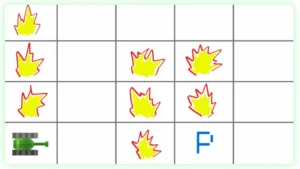
The correct list of commands is: forward = 1; left; forward = 3; right; forward = 3; right; forward = 3; right; forward = 1
FAQ: Answers to frequently asked questions
Where is Java used?
Why choose Java to learn?
Is Java difficult to learn?
Do I need to know other programming languages before learning Java?
Where to start learning Java?
Starting with the basics: Java syntax, variables, data types, conditions, loops, methods, arrays, and basic OOP. Then you can move on to practical tasks and small projects: console programs, mini-apps, and working with files and databases.
Helpful resources to get you started:
- official Java documentation ;
- articles about language and backend;
- interactive environments for quickly running code, such as JDoodle and Replit ;
- Courses that help future developers structure their learning systematically—from language basics to Spring, testing, and creating their own applications.