What is an API and what does a web developer need to know about it?
What is an API and how does it work?
An API can be:
● In a programming language, different functions interact correctly with each other. Each function here acts as an “application,” and the API becomes a set of instructions for correctly calling these functions.
● The operating system, so that programs can extract data from it and, if necessary, change OS settings. When developing an application for Windows, Linux, or Android, you need to know the API of that system to work with files and graphics.
● For web services, so that other web services and programs can connect to them and work together.
Web developers most often encounter web APIs, so we’ll focus on them from now on. However, much of what we’ve said applies to all APIs in general.
An API is called an interface because it’s a tool for interaction. Just as a button is a user interface, an API is an interface for a program, communicating with it in a “comprehensible language.”
Using the API
The API works simply:
- A third-party developer writes their own application, function, or operating system.
- He creates an API – a set of rules based on which other developers can use his development in one way or another.
- You receive this API – it is either publicly available or open to clients upon request.
- You call the API within your application and use the functions you need.
You don’t need to know how the API function you’re calling works. It could be very complex and contain thousands of lines of code, but you’ll only need to call it once and get the desired result.
You can also create API functions for your web application—a set of instructions that other applications can use to access yours. This is necessary so that integration with your service can be set up.
API Functions: What You Can Do with It
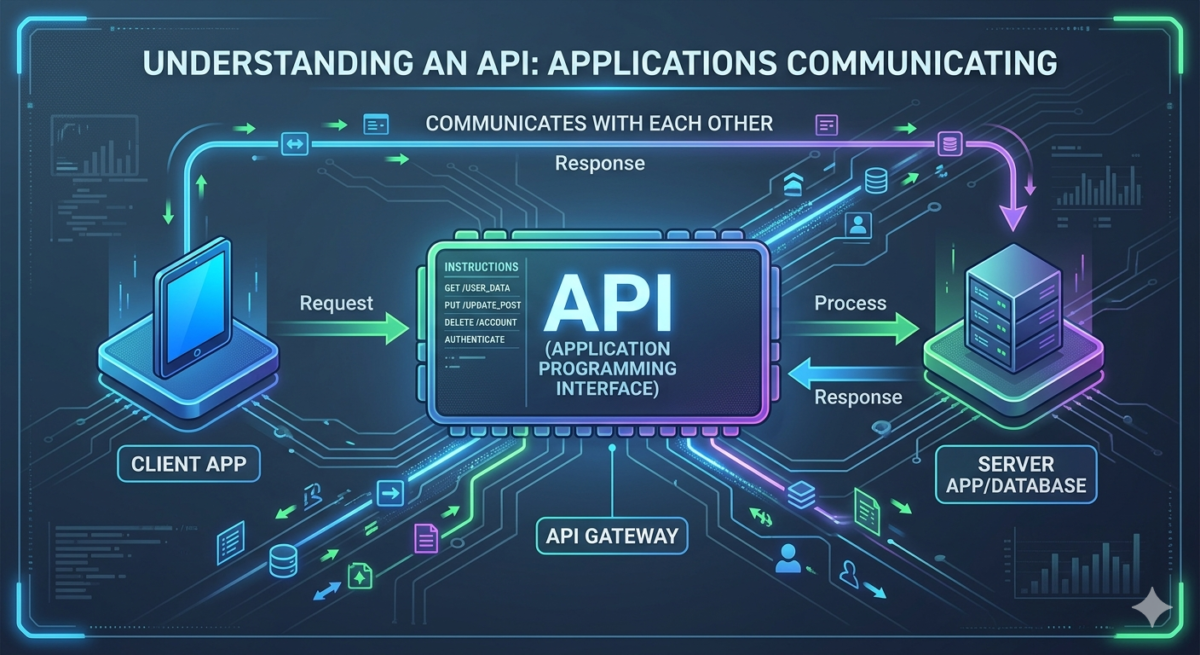
The basic functions of the API are to retrieve, send, modify, or delete information. To do this, your application sends a request to a third-party service, which in turn generates a response.
The specific functionality depends entirely on the application providing the API. This could include:
● sending you exchange rates;
● authorization in the CRM system with the ability to add, delete, and change information;
● making a payment through the banking system;
● voice recognition and translation into text;
● translation of text;
● obtaining information about current product balances.
Benefits of working with APIs
Essentially, there’s only one advantage: the API allows you to use existing functions rather than develop your own. It’s like libraries in programming languages: instead of writing your own sorting function, you can simply connect to a library and use a ready-made, preconfigured tool.
For example, you don’t need to write your own comment service—you can find a suitable one, connect to it via API, and add it to your site.
Or let’s imagine you have an internal CRM system and want to add time tracking to it. You can develop this feature yourself, or you can find a tracking service, use its API, and connect it to your CRM.
Ultimately, working through an API saves programmers’ time and business development budgets.
This advantage has an additional benefit: using APIs makes your application more secure. If your company doesn’t specialize in information security, it will be difficult to create a secure payment tool or authorization scheme. This is where APIs come in: their developers are primarily focused on security, and you can leverage their work and focus on solving more important business problems.
How to call and work with the API
The API call is usually described in its documentation. Typically, the call requires sending data to a server whose address is specified as a URL.
For example, let’s imagine you want to add Yandex Maps to your website. This is described in detail in the documentation, but a general example of working via the API looks like this:
- You include the map in the header of your page:
< head >
< script src = “https://api-maps.yandex.ru/2.1/?apikey=your API key&lang=ru_RU” type = “text/javascript” >
< / script >
< / head >
You need to obtain an API key separately, as the Yandex Maps API is closed.
- Create a container to hold the map:
< body >
< div id = “map” style = “width: 600px; height: 400px” > </ div >
< / body >
- Add the card code:
< script type = “text/javascript” >
// The ymaps.ready() function will be called when
// all API components will be loaded, and also when the DOM tree is ready.
ymaps.ready(init);
function init (){
// Create a map.
var myMap = new ymaps.Map( “map” , {
// Coordinates of the map center.
// Default order: “latitude, longitude”.
// To avoid having to manually determine the coordinates of the map center,
//Use the Coordinate Definition tool.
center: [55.76, 37.64],
// Zoom level. Valid values:
// from 0 (the whole world) to 19.
zoom: 7
});
}
</ script >
Essentially, the API call only occurs in the first step. Next, we take the already-called API and use the functions it provides.
Another query option is information about current prices on Yandex Taxi. The query would look like this:
GET https://taxi-routeinfo.taxi.yandex.net/taxi_info?rll=37.589569560,55.733780~37,56&clid=t…3&apikey=q…3
And the answer to it is:
{
” currency “: “RUB”,
” distance “: 61529.771101536542,
” options “: [
{
” class_level “: 50,
” class_name “: “econom”,
” class_text “: “Economy”,
” min_price “: 495,
” price “: 10945,
” price_text “: “10945 rub.”,
” waiting_time “: 203.98798614740372
}
],
” time “: 3816.9397069215775
}
The specific syntax of an API request depends on the programming language we’re using. For example, in Python, it would be the request function.
Variables often need to be passed into a request. They can be statically embedded in the request, or they can be retrieved from the server or the user. For example, you can write code so that the user enters data, which is saved in variables and then inserted into the API call. It all depends on your needs and objectives.
API usage examples

This API is so simple that you can call it directly in your browser by typing ” https://http.cat/<error number>” in the address bar.
Accessing Federal Reserve Data
The Federal Reserve provides a robust API for retrieving real-time economic indicators, such as interest rates or the Trade Weighted US Dollar Index. For instance, the FRED API allows developers to pull specific economic series data directly into their applications. To retrieve and display the latest value for a specific economic data point using PHP, you could use the following implementation:
PHP
<?php

function get_fed_economic_data() {
    static $economic_data;

    // In a real scenario, you would use an API key from the Federal Reserve Bank of St. Louis
    // Example: https://api.stlouisfed.org/fred/series/observations?series_id=DTWEXB&api_key=your_key&file_type=json
    if ($economic_data === null) {
        $url = 'https://api.stlouisfed.org/fred/series/observations?series_id=DTWEXB&limit=1&sort_order=desc&file_type=json&api_key=demo';
        $response = file_get_contents($url);
        $economic_data = json_decode($response);
    }

    return $economic_data;
}

$data = get_fed_economic_data();
$latest_value = $data->observations[0]->value;

echo "Current Trade Weighted US Dollar Index according to the Federal Reserve: {$lates
There are even more complex APIs available that offer a vast array of specialized functions and deep integration capabilities. These range from enterprise-grade banking interfaces and cloud infrastructure systems to high-performance geospatial services like Google Maps or Mapbox. In these instances, the full API documentation is typically published on a dedicated developer portal or provided directly to engineering teams upon request.
Examples of pages like APIs:
In the United States, the ecosystem for professional APIs is vast, ranging from language processing to high-level financial infrastructure. Here are the US-based equivalents for those services:
-
Google Cloud Translation API: A powerful tool for dynamic language translation used by developers worldwide. (Google Cloud Translation)
-
Google Custom Search API: Allows you to retrieve and display search results from your own website or the entire web programmatically. (Google Programmable Search)
-
JPMorgan Chase or Stripe API: Used for deep financial integration, payment processing, and business treasury management. (Stripe API Docs / J.P. Morgan Developer)
-
LinkedIn Talent Solutions API: Enables direct integration with job postings, applicant tracking, and recruiter tools. (LinkedIn Developer Solutions)
Features of a modern API
REST API. A web API itself can be designed in any way. But for the convenience of developers, there is the REST API —a specific set of standards for creating APIs using the HTTP protocol. This set of rules helps standardize programming interfaces and make them clear and readable.
OpenAPI. When we use a third-party web API, we also need to integrate it into our program. This is often tedious work that can be automated. For this purpose, OpenAPI exists—a specification that formalizes API writing and enables automatic generation of APIs and integrations for working with a wide range of third-party applications.
Using the gRCP protocol. Currently, XML/JSON over HTTP 1.1 is the preferred method for exchanging web API requests. However, this approach has a problem: it requires strictly defined requests, which are not very convenient to code. Furthermore, XML/JSON requests are quite heavy and put a strain on the network.
To address these issues, a new protocol, gRCP, is currently being actively implemented. It allows for the exchange of lighter requests and the creation of simpler APIs for exchange. While it hasn’t yet become a standard, gRPC can already be used by incorporating specialized libraries.