The Main Programming Language for Front-Enders: Why Learn JavaScript
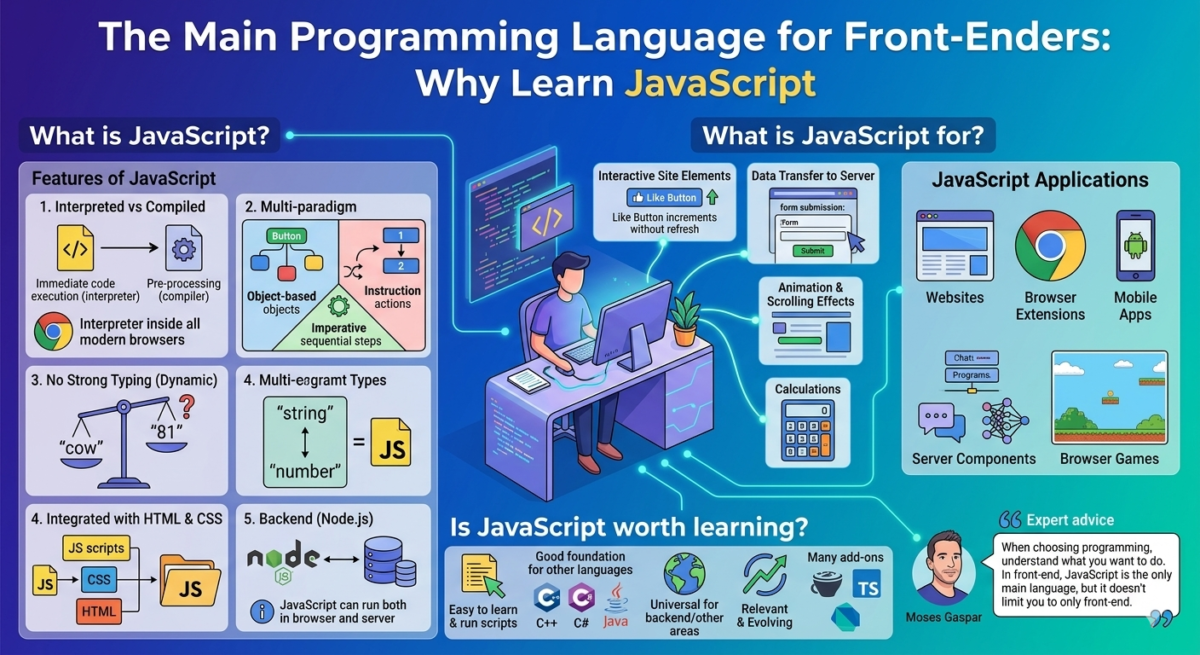
Table of Contents
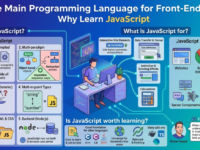
Features of JavaScript
JavaScript is a programming language primarily used on the web. It’s used to make websites interactive: pop-ups, animations, like buttons, and submission forms are added. It’s also known as the primary front-end language—the “face” of a website where users interact.
JavaScript is similar to Java, Python, Go, C#, but has its own characteristics:
1. Interpreted, not compiled. All programming languages fall into two groups. Code in compiled languages must first be run through a special program, a compiler, before it can be used. Most modern languages are compiled, unlike JavaScript.
Code in an interpreted language doesn’t need to be compiled. It’s written and immediately passed to an interpreter program, which executes it on the fly. This speeds up development, but requires running the code in conjunction with an interpreter. However, the JavaScript interpreter is built into all modern browsers, so running the code is straightforward.
2. Multi-paradigm. There are several paradigms in programming:
● Object-based. In this paradigm, objects are created for each entity in the code, such as an order button. The relationships between these objects are then defined.
● Functional. This paradigm places more emphasis on specific instructions. A button here is not an object; in the code, it is designated as a sequence of actions that occur after being clicked.
● Imperative. In this paradigm, code is written as a clear set of instructions that are executed strictly sequentially. The imperative and functional paradigms are often used together.
Languages are often designed to work with a single paradigm. JavaScript is different—it doesn’t dictate how to write code and allows for a variety of styles and methods.
3. No strong typing. Some programming languages have static typing. If you create a variable, you must first define its type, such as a number. And you can’t store anything other than a number in it.
JavaScript has dynamic typing—you can put anything into a variable. This makes coding easier, but it can also introduce errors. For example, JavaScript will let you compare a string with a number and even return a result. Which is bigger, “cow” or “81”? JavaScript knows the answer.
4. Integrated with HTML and CSS in browsers. HTML and CSS are markup languages for websites. They are not programming languages, as they don’t allow for functions or processing. They are used to define the website’s appearance: block layout, font size, and colors. Making a website interactive requires a programming language, and JavaScript is ideal for this. Modern browsers allow you to simply insert JavaScript code directly into HTML and CSS markup, and everything works.
For convenience, scripts are often written in separate files, and then a reference to the file is inserted into the code. This allows you to avoid cluttering the page code and use the same scripts in different places without rewriting them.

5. Suitable for the backend. JavaScript code can be run both in the browser and on the server. This means it can be used to write not only interactive page elements but also the server-side portion of a website, such as data processing and calculation functions. However, this requires mastering a separate tool: Node.js. This is an engine that allows JavaScript to run on the server rather than in the browser.
JavaScript is sometimes confused with Java due to their similar names. In reality, they are completely different languages for different purposes. Java was simply very popular a long time ago, and its name was added to JavaScript to attract attention.
What is JavaScript for?
● Make the site interactive—so that it’s not just a static page, but a dynamic program that responds to user actions. For example, if you click the “Like” button, the number of likes on a post increases immediately, without refreshing the page. This is the result of using JavaScript.

Interactive elements on the site are made using JavaScript.
● Transfer information between the user and the server. Scripts written in JavaScript send user-entered information to the server.
● Animate objects – add scrolling to a section by clicking a button, background animation, or moving objects.
● Perform calculations. For example, in an online calculator on a website. This can be done either on the server side or in the browser itself using JavaScript.
● Write the server-side of a website or application.
JavaScript Applications
Now, let’s go into a little more detail about what can be written in JS and where it is used most often.
Websites and web applications. The most popular use of JavaScript is writing website code. Almost every modern website uses code written in JS.
Browser extensions. Small, simple scripts that add additional functionality—block ads, save audio, send notifications about new emails, or change a website’s color scheme.
Mobile apps. These can be written in specialized languages, such as Kotlin. But if you need something simple, like an interface for working with cloud storage, you can write it in JavaScript and assemble it into an app using specialized tools.
Server-side components of websites and programs. The JavaScript programming language can be used to write any kind of service: chats, computer programs, and even neural networks. To do this, you need to connect it to the Node.js engine.
Games. You can write simple browser games in JS. Here’s an interesting platformer with unusual physics.

How JS code works on a website
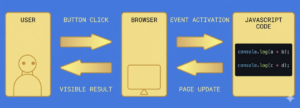
JavaScript itself doesn’t have any inherent capabilities—it’s simply a programming language. Its capabilities depend on what the browser allows it to do. In modern browsers, JavaScript code can:
● Modify existing HTML code on the page or add new code, change styles. For example, change the color of the header.
● React to a mouse click, pointer movement, keypress, or scrolling.
● Send a network request to the server to download or upload a file. For example, take an image submitted by the user and send it to the server for storage.
● Ask the user questions and display messages.
● Remember data and store it on the client side, in their browser. For example, save a document offline until the user clears the cache or refreshes the page.
What JavaScript can’t do in the browser
JavaScript was originally designed as a secure language. Browsers prevent it from deeply interfering with the user’s computer and other websites. Therefore, JS in the browser cannot:
● Read and write files to the user’s hard drive, run programs, and work with OS system functions. It can only access what the user has voluntarily agreed to download through the browser. Some browsers, such as Mozilla Firefox, already have this read and write functionality, but it is not yet available everywhere.
● Use the camera and microphone without the user’s permission.
● Interact with other windows and tabs. To do this, both pages must “agree” to this and have a special code for exchanging data. This protects the user and prevents an unknown site from interacting with a tab where, for example, social networks or email are open.
● Easily obtain data from other sites and domains. This is possible with the consent of the other site or server.
Some restrictions on the use of JS can be lifted; the browser will ask the user for permission to do so.
Is JavaScript worth learning?
For those planning to become a front-end developer, it’s definitely worth it. This language will be your primary working tool. Without JavaScript, it’s impossible to develop the user-facing parts of websites and web applications.
JS has other benefits to learn:
● Easy to learn. You can write and run your first script in just five minutes. And after a couple of days of training, you can put together a fully functional program, for example, a browser extension.
● Good as a base. You can use it to master the fundamentals that are common to all programming languages. And then move on to learning from others. “C-like” languages: C++, C#, Java, and PHP are especially good after JS.
● Universal. If you master Node.js, you can move from the frontend to the backend or to another area of development.
● Relevant. JS was created over 20 years ago, but it is still evolving and has not given up its position as the main language for the frontend.
● Has many add-ons. CoffeeScript, TypeScript, Dart, and other add-ons make the code more compact, cleaner, and stricter. You can study them to develop in the frontend field.