The Tycoon2FA phishing kit now supports device phishing attacks and abuses Trustifi click-tracking URLs to hack Microsoft 365 accounts.
Despite international law enforcement activity disrupting the Tycoon2FA phishing platform in March, malicious operations were rebuilt with new infrastructure and quickly returned to normal activity levels.
Earlier this month, Abnormal Security confirmed that Tycoon2FA was back up and running and added new layers to strengthen its resilience to new intrusion attempts.
In late April, Tycoon2FA was spotted in a campaign that used the OAuth 2.0 device authorization flow to compromise Microsoft 365 accounts, indicating that the operator continues to develop the kit.
Phishing is a type of attack where malicious actors send a device authorization request to a targeted service provider and transmit the generated code to the victim, who they trick into entering the service’s legitimate login page.
Doing so authorizes the attacker to register the rogue device with the victim’s Microsoft 365 account, giving him unrestricted access to the victim’s data and services, including email, calendar, and cloud file storage.
Push Security recently warned that this type of attack has increased 37x this year, supported by at least ten different phishing-as-a-service (PhaaS) platforms and encryption services. A recent report by Proofpoint records a similar increase in the use of the tactic.
Tycoon2FA adds a device phishing scam
According to new research from detection and response affiliate eSentire, Tycoon2FA confirms that device phishing has become increasingly popular among cybercriminals.
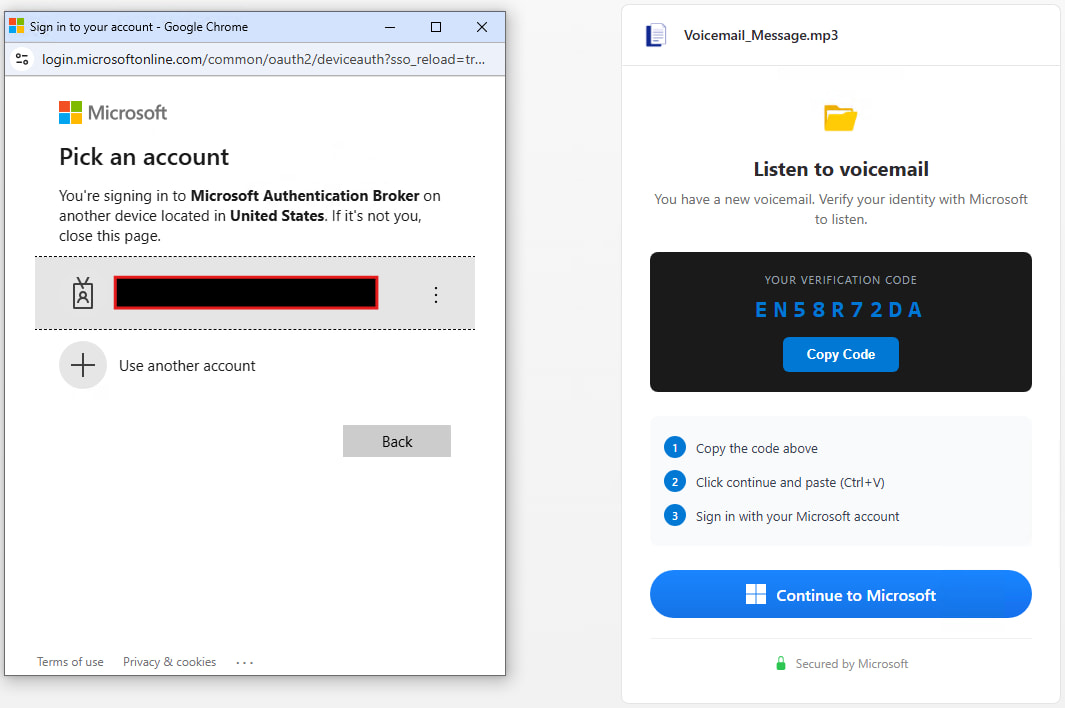
“The attack begins when a victim clicks on a Trustifi click-through URL in a phishing email and ends with the victim unwittingly providing OAuth tokens to an attacker-controlled device through Microsoft’s official device login flow at microsoft.com/devicelogin,” explained eSentire.
“Connecting those two ends is a four-layered browser delivery chain whose Tycoon 2FA technology is virtually unchanged from the TRU authentication variant dated April 2025 and the post-delegation dated April 2026.”
Trustifi is an official email security platform that offers a variety of tools integrated with various email services, including those from Microsoft and Google. However, eSentire does not know how the attackers came to use Trustifi.
According to the researchers, the attack uses a phishing email with an invoice containing a Trustifi tracking URL that redirects through Trustifi, Cloudflare Workers, and several obfuscated JavaScript layers, placing the victim on a fake Microsoft CAPTCHA page.
The phishing page returns the device’s Microsoft OAuth code to the attacker’s backend and instructs the victim to copy and paste it into ‘microsoft.com/devicelogin,’ after which the victim completes multi-factor authentication (MFA) at the end.
After this step, Microsoft removes the OAuth access and renews the tokens on the device controlled by the attacker.
Source: Sentire
The Tycoon2FA phishing kit includes comprehensive protection for researchers and automated scans, detecting Selenium, Puppeteer, Playwright, Burp Suite, blocking security vendors, VPNs, sandboxes, AI crawlers, and cloud providers, and using debugging traps.
Requests from devices displaying the analysis site are automatically redirected to Microsoft’s official page, eSentire said.
The researchers found that the kit ban list currently contains the names of 230 vendors and is updated regularly.
eSentire recommends disabling OAuth device code flow when not required, limiting OAuth authorization permissions, requiring administrator authorization for third-party applications, enabling Continuous Access Auditing (CAE), and enforcing compliant device access policies.
Additionally, researchers recommend monitoring Entra logs to verify deviceCode, Microsoft Authentication Broker usage, and Node.js user agents.
eSentire has published a set of indicators of compromise (IoCs) for the latest Tycoon2FA attack to help defenders secure their site.

Automated testing tools deliver real value, but they’re designed to answer one question: can an attacker deploy on a network? They are not designed to check that your controls are blocking threats, your firewall detection, or your cloud configs.
This guide covers the 6 areas you really need to verify.
Download Now