What is Dedik: An educational program on dedicated servers
High-load projects require dedicated solutions. Why dedicated servers are the ideal choice for high-traffic sites with unique requirements.
Table of Contents
What is a Dedicated Server?
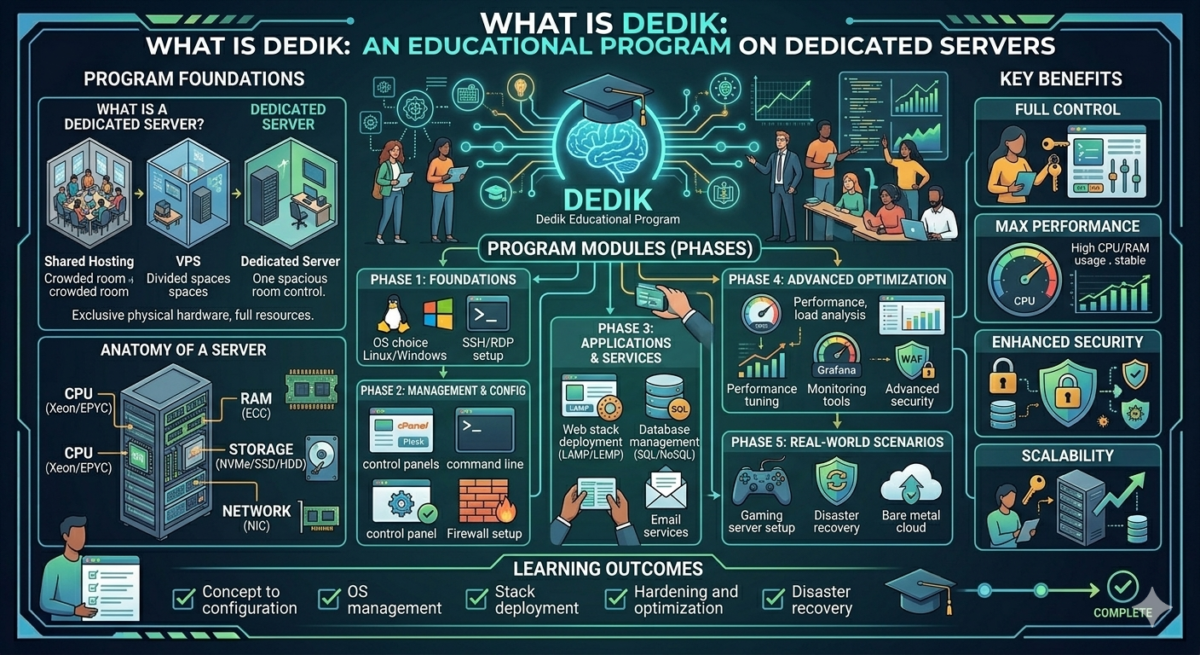
A Dedicated Server is a dedicated physical server (dedicated server) that is fully dedicated to a single user or organization, with all resources, including a processor, RAM, and hard drive. This individual use and isolation from other users allows for complete control over computing resources and ensures a high level of reliability and data security.
The difference between Dedik and VDS/VPS
A VDS/VPS is a virtual server created on a physical server (dedicated server) using virtualization technology. It has guaranteed resources and its own operating system, isolated from other virtual machines on the same hardware. VDS/VPS are isolated at the operating system, memory, process, and disk levels, but share the CPU, RAM, disk, and network bandwidth of the hardware. Therefore, the difference between dedicated servers and VDS/VPS is that on a dedicated server, all physical resources—CPU, RAM, and disk subsystem—are owned by a single client. They are not shared with other users, eliminating the impact of server “neighbors” on performance.
Why do you need a grandfather?
A dedicated server is essential for projects that require varying amounts of computing power. These can range from pet projects to enterprise services, such as marketplaces. These projects are characterized by high traffic and unique software and hardware requirements.
- For handling large volumes of traffic without performance loss or latency, when stable service performance is critical, even under high load.
- To independently configure the security level and control protection parameters in accordance with project requirements.
- For flexible configuration for specific tasks: to avoid sharing resources with other users, use all the hardware and install any necessary software without restrictions.
Who chooses the dedicated server?
A dedicated server is the optimal solution for websites with high and very high traffic, especially if they require powerful servers due to intensive computing, databases, or real-time data processing.
- E-commerce and CMS (WooCommerce, Bitrix). Online stores with thousands of products, search, shopping cart, and integrations (payments, CRM) load CPU/RAM due to dynamic MySQL/PostgreSQL queries. For such projects, it’s important to:
- withstand peak loads;
- stable response speed;
- performance guarantee, since such projects use heavy background tasks (import, recalculations, integrations).
- Video/audio hosting Websites with streaming video, podcasts, or file storage require large disks (500GB+ SSD), high bandwidth (10 Gbps), and a CDN. Video transcoding is CPU-intensive, so powerful processors are required.
- Corporate portals and CRM . Platforms with authentication, dashboards, APIs, and multi-user access (such as 1C-Bitrix, custom CRM) depend on databases and scripts (PHP/Node.js). Therefore, they are RAM-intensive.
- Interactivity and AI/ML . Websites with chats, games, image processing, or neural networks (content generation) require low latency and GPU/multi-core processing. Functionality such as real-time updates or ML models requires RAM resources and specialized software.
Advantages and disadvantages of dedicated servers
Advantages:
- Project scalability. Users will receive powerful, turnkey computing resources on-demand in minutes.
- Own cloud server infrastructure. If you need to create your own VDS infrastructure, this is possible by renting a dedicated server on which to deploy cloud servers.
- High-load projects .The ability to host large databases, large corporate websites, or projects with increased security and data privacy requirements.
- A customized solution. Allows you to rent a reliable and flexible solution tailored to your needs, offering an optimal price-to-performance ratio.
Flaws:
- The cost may be higher than purchasing your own server. This is due to the expensive equipment, which requires ongoing support from highly specialized specialists, as well as the costs of data center hosting, reliable power supply, and network connectivity
- Maintenance is required. Dedic requires specialists to install and configure the equipment, as well as monitor its proper operation .
- The need to configure, install, and update software yourself. Unlike PaaS and SaaS services, a dedicated server requires you to deploy the infrastructure yourself. This task is partially solved by pre-installed operating systems and images with software packages
Maintaining a functioning server is the provider’s responsibility, but some information about problem symptoms can be obtained directly from server users.
Dedicated servers also need protection. Like any online resource, they are vulnerable to cyberthreats. Powerful DDoS attacks overload their resources and disable them, which is critical for both the server hardware and for regular users and businesses as a whole.
Methods of connecting to a dedicated server
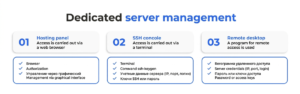
There are three ways to connect to the dedicated server: via the control panel, the OS console, or a remote desktop.
1. Hosting control panel
A simple interface that typically includes options for managing DNS records, FTP accounts, databases, a file manager, and more. Some hosting control panels allow you to configure software or hosting components. Dedicated server operating system customization may be limited.
2. Management via SSH console
Using the server command line allows for more flexible configuration, allowing for complex tasks. This management method is only suitable for technical specialists, as it requires sufficient skills and knowledge.
3. Remote Desktop Control
Allows you to connect using a graphical interface and manage the server as if it were a local computer.
Choosing the appropriate management method depends on the operating system, specific needs, and the administrator’s experience level.
How to set up and use a dedicated server
After purchasing a dedicated server and gaining access to it, you’ll need to complete several steps. First, you’ll need to complete some basic setup. This will help protect the server from unauthorized access attempts and prepare it for use. To set up a dedicated server, follow these steps:
- Install an SSH client on your computer —this is a remote access protocol—and connect to the server via it.
- Change the default password you receive after ordering the server to a new and secure one.
- Update the entire software package .
- Install Fail2Banwhich willll protect you from various malicious attacks, such as brute force attacks.
- Configure a firewall to further protect your server.
Please remember that setting up a dedicated server requires specific technical knowledge and experience. If you or your system administrator lacks expertise in this area, we recommend consulting with specialists. It’s also important to ensure the security of all possible access points to the infrastructure being created. This will help protect your database from unauthorized access.
Practical material prepared in collaboration with Selectel experts
How to choose a dedicated server
There are several factors to consider when choosing a dedicated server:
1. Server configuration
Determine the task you’ll be using the server for and its specifications. It’s convenient if the provider offers a wide range of configurations —from inexpensive servers with desktop components to high-performance solutions, including specialized machines with the latest-generation GPUs like the NVIDIA H200.
Please note:
- Processor type and generation – the latest CPU models provide long-term scalability.
- volume and type of RAM (DDR4/DDR5, expandable);
- type and speed of the disk subsystem (NVMe, RAID arrays);
- availability of GPU accelerators for ML, rendering, or large-scale computing tasks;
- a variety of ready-made configurations for different loads.
The wider the choice, the greater the likelihood of getting a server that exactly meets the project’s objectives.
2. Possibility of server upgrades and automatic OS installation
A project isn’t always static. Therefore, it’s important to evaluate in advance how flexible the provider is in changing server specifications.
Please specify:
- Is it possible to increase the amount of RAM?
- Is it possible to replace or add disks?
- Is a processor upgrade or a switch to a more powerful configuration available?
- Is automatic installation of operating systems provided (Linux distributions, Windows, custom images)?
- Are there any tools for quickly reinstalling a server, restoring from templates, or manually configuring BIOS/UEFI settings?
Flexible server management allows you to adapt your infrastructure to current tasks and anticipate project growth without unnecessary downtime.
3. Security
Choose a service provider that offers built-in security features, such as DDoS protection. This will help you avoid several risks:
- disabling a web resource for an indefinite period of time;
- loss of confidential data;
- technical costs;
- loss of positions in search results;
- blackmail or parallel cyberattacks.
Dedicated servers with security included are not only convenient but also more cost-effective than purchasing server rental and security services separately from different providers.
4. Integration with other provider products
A dedicated server rarely exists in isolation. It’s usually part of a larger infrastructure. Therefore, it’s important to think through how exactly the server will be used in conjunction with other services.
It is useful to clarify:
- the presence of a cloud infrastructure (IaaS), in which you can store backups or additionally run virtual machines;
- available managed database services (DBaaS) or cluster solutions;
- the ability to set up Direct Connect or a dedicated channel to your office/data center;
- Compatibility of servers with other ecosystem products (cloud servers, S3 storage, databases, load balancers, Kubernetes clusters).
A comprehensive infrastructure simplifies scalability, improves resiliency, and reduces the total cost of ownership.
5. Network capabilities: Internet, local area networks
Network connectivity is a key factor when choosing a server. It impacts request processing speed, access stability, and ease of use.
Check with your provider:
- speed and type of Internet channel (1/10/40/100 Gbps);
- traffic policy – limited, unlimited, with or without incoming traffic;
- quality of routing and availability of direct channels to key operators;
- the ability to organize a local network between servers (L2/L3, private VLAN);
- network fault tolerance level, channel redundancy, Anycast availability;
- connection conditions, such as dedicated IP, IPv6, and additional subnets.
A reliable network minimizes latency and ensures uninterrupted service operation, which is especially important for high-load projects.
Why is renting a dedicated server more profitable than buying one?
Buying your own hardware only seems like a good idea at first glance. In practice, it leads to significant start-up costs and a number of additional challenges.
The main disadvantages of purchasing equipment:
- Large one-time CAPEX costs – servers are expensive, and purchasing them requires a significant upfront investment.
- High cost of capital raising if borrowed funds are used.
Constant OPEX during operation:
- Renting space in a data center or operating expenses in your own data center
- Work of the engineering team.
- Difficulty scaling—as the load increases, you have to repurchase equipment, wait for delivery, shipping, and setup.
- The inconvenience of changing the configuration is that hardware upgrades are limited by the purchased platform.
- Risks and delays due to logistics, customs, import restrictions, and component shortages.
What are the advantages of renting a dedicated server? The provider takes care of equipment supply, maintenance, component replacement, configuration, and network infrastructure, and also offers ready-made solutions for growth and redundancy. Thanks to market competition, the price and quality of services are usually more competitive than if you own the hardware yourself.
How to choose a dedicated server host
Choose a hosting provider based on a comprehensive analysis of their services. Below are key criteria to consider when choosing a dedicated server vendor:
Technical support
Choose a provider that offers live, qualified technical support, not just AI-assisted chat. It’s important to have engineers capable of solving complex problems, providing architectural consultations, and promptly responding to incidents.
Please specify:
- Is 24/7 ticket support available with a live specialist (not a bot)?
- Are there specialists with real administrative experience working there, and not just first-line operators?
- Is it possible to quickly replace components—from individual RAM modules and disks to a complete platform replacement with the relocation of your disks without data loss?
- How quickly the vendor responds to hardware incidents and meets the SLA for hardware replacement.
Having real engineering support is a key factor in the reliability of a dedicated server.
Reputation
Choose providers with a strong market position. Look at reviews, customer case studies, and the company’s history.
Be sure to review the SLA—a document that outlines the parties’ responsibilities, guaranteed uptime, incident response time, and handling procedures. A well-written SLA protects you from downtime and miscommunication.
Pay attention to already implemented cases; large companies choose reliable suppliers.
Tasks and characteristics
Before selecting a server, it’s important to clearly define the project’s goals and infrastructure requirements. For pet projects, personal tasks, or test environments, simpler, more affordable configurations are suitable—price and basic functionality are usually the top priorities here. However, if the project is planning for growth, critical load, or commercial use, it’s important to consider:
- scalability and resource growth;
- availability of related services: cloud, databases, direct connect, backups, private networks, Kubernetes, CDN;
- hardware relevance and regular server fleet updates at the provider for long-term scalability;
- a variety of configurations, including servers with modern CPUs, NVMe, and GPU accelerators;
- the ability to smoothly switch to more powerful configurations without long downtimes.
Together with the provider’s specialists, it is worth determining: the amount of RAM, the type and number of disks, the desired server performance, the network architecture, and the range of additional services.
Price
Pricing depends on the configuration, service level, and additional features. It’s important to choose a solution that meets the project’s needs, rather than overpaying for unnecessary features.
Please note:
- Good providers have available configurations for pet projects, test environments, and low-load services.
- For commercial projects, it is important to consider not only price, but also reliability, security, SLA, and quality of support.
- Cheap solutions without protection and infrastructure can lead to much higher costs – for example, when recovering from a DDoS or hardware failure.
Choose a provider that offers a fair balance of cost, quality, and infrastructure growth opportunities.