What is DNS hosting?
DNS hosting is a large topic within another, even larger topic: DNS. This article explains in more detail why it’s important to ensure DNS hosting security, who needs it, and how it works.
Table of Contents
What is DNS hosting?
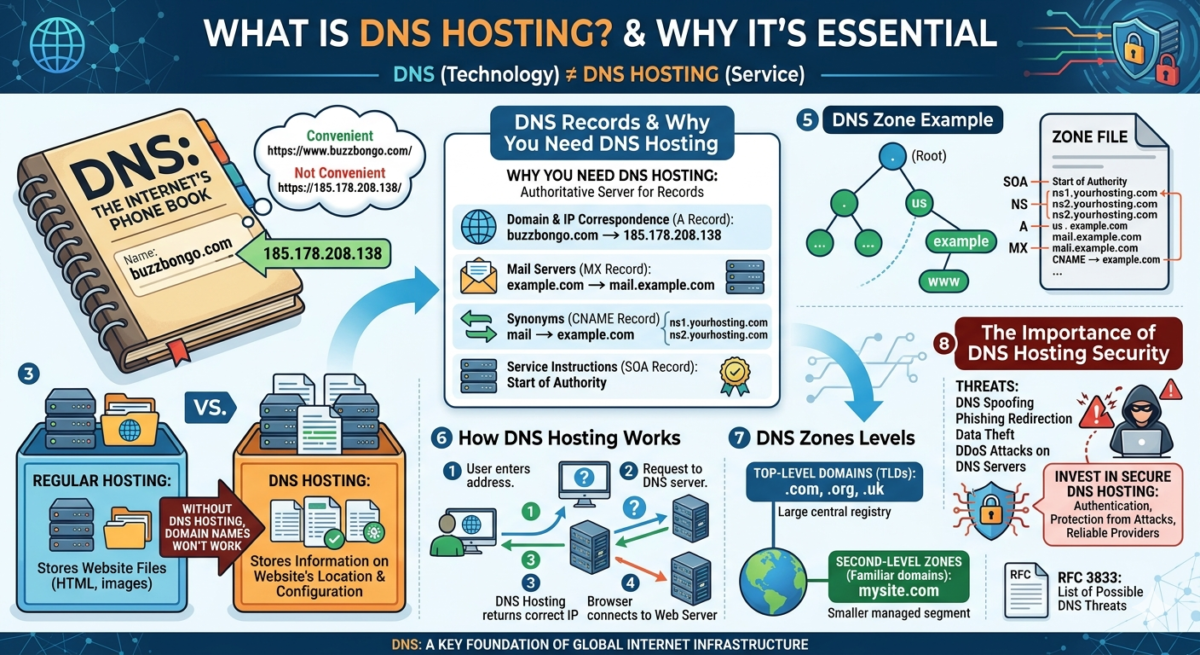
First, let’s start with one important detail: DNS (as a technology) and DNS hosting (as a service) are not the same thing, and they shouldn’t be confused. DNS is often compared online to a phone book—and we think this is an excellent metaphor that clearly explains the essence of the technology.
Let’s imagine you urgently needed to activate DDoS protection, and the first thing you did was type the protection provider’s website address into your browser’s search bar. It looks like this: https://185.178.208.138/. What’s more, imagine all internet addresses looking like this. It’s not very convenient, right? It’s much nicer and more intuitive to see, search, and type https://www.buzzbongo.com/.
The example above shows how the DNS (Domain Name System) service works. In other words, it transforms human-readable IP addresses into more readable forms. DNS hosting, on the other hand, is the location/service where all your IP information will be stored.
While regular hosting stores website files, DNS hosting stores information about the website’s location and many important configuration settings for resource records. Without DNS hosting, a domain name won’t work, even if the website itself is accessible on the server. The foundation of DNS hosting is a system of DNS records—special strings that map names to network addresses.
Why do you need DNS hosting?
DNS hosting is needed as an authoritative server that stores data about your domain—in other words, DNS records:
- Domain and IP correspondence (as in the same phone book, where ddos-guard.ru will correspond to 185.178.208.138).
- Mail server address or MX record for receiving and sending email.
- Service instructions about the zone master server and administrator.
- Lists of synonyms for a valid domain name are CNAME records.
- Pointing to DNS hosting servers (NS records) that are responsible (authoritative) for this particular zone.
DNS record example
; SOA (Start of Authority) Record – Basic information about the
example.com zone. IN SOA ns1.yourhosting.com. admin.example.com. (
2024072001; Serial number
7200; Refresh (2 hours)
3600; Retry (1
hour)
1209600; Expire (2 weeks)
3600 ); Negative Cache TTL (1 hour)
; NS (Name Server) records – Point to DNS servers responsible for the
example.com zone. IN NS ns1.yourhosting.com.
example.com. IN NS ns2.yourhosting.com.
; A (Address) Record – Associates the domain with the IP address
example.com. IN A 192.0.2.1
www IN A 192.0.2.1
; CNAME (Canonical Name) Record – Creates an alias for another domain
mail IN CNAME example.com.
ftp IN CNAME example.com.
; MX (Mail Exchanger) records – Point to mail servers
example.com. IN MX 10 mail1.example.com.
example.com. IN MX 20 mail2.example.com.
; A records – for mail servers (required for MX)
mail1 IN A 192.0.2.10
mail2 IN A 192.0.2.20
; TXT (Text) Record – For various text information,
example.com. IN TXT “v=spf1 mx ~all” ; SPF record for spam protection
; AAAA Record (IPv6 Address) – Analogous to the A-record for IPv6
example.com. IN AAAA 2001:0db8:85a3::8a2e:0370:7334
A few clarifications regarding the DNS record example:
There are several utilities for checking DNS records, such as nslookup and dig. These can be used to find out what the DNS says about a domain—its IP, MX, TXT, CNAME, and other records. Lines with “;” are program comments to make the file contents easier for humans to read.
DNS zones
We mentioned the concept of DNS records (MX, CNAME, and others) above. All these records are grouped into a DNS zone —a logical area managed by a specific DNS hosting service. It contains all data about a domain and its subdomains. A DNS zone is part of the global DNS system, defining the boundaries of responsibility within the domain name hierarchy. Simply put, a zone stores a set of records describing the settings for a specific portion of the DNS space.
There are two main levels of DNS zones:
Top-level domains (TLDs)
—zones like .us,.uk, .ru, .com, .org, and so on—are large segments managed by central organizations (registries). The servers in these zones store information not about the IP addresses of websites, but about which DNS hosting servers (NS records) are responsible for all second-level domains in that zone (for example, mysite.com).
Second-level zones (familiar domains)
When you register a domain, such as mysite.com, you create your own managed segment— the mysite.com DNS zone. This moysite.com zone is hosted on your DNS hosting servers. It contains all the resource records (A, MX, CNAME) that manage your website, email, and subdomains (e.g., blog.moysite.com).
A DNS zone is a collection of data related to a specific node in the global domain name hierarchy. Some of this data describes the node itself, while others describe its immediate descendants.
For example, for the site example.us, information is distributed between three zones:
- The root zone stores information about where to look for data for the .us zone.
- The .us zone contains information about the location of the examlpe.us zone.
- The example.us zone already includes a record for the name example.us.
Another visual explanation of why the term “domain tree” exists is that it is represented as a root system:
. (root)
└── us
└── example
└── www
All the necessary information about a specific zone is stored in a special text document—a zone file. Despite the proliferation of databases, many DNS systems still implement this structure as simple text files.
Each zone has its own administrator—this could be an organization or an individual responsible for its maintenance and operation. There may also be accredited registrars that provide services to users, helping them register and maintain specific domains within a given zone. For example, Reg.ru for the .ru zone.
The root zone is managed by the international organization ICANN (Internet Corporation for Assigned Names and Numbers, www.icann.org ), which defines the basic rules for the operation and use of domain names.
How DNS hosting provides access to a website using a domain name
When you enter the address of the desired website in your browser, a whole process of converting the domain name into an IP address begins, which takes only a few seconds:
- The request is sent to the provider’s DNS server or the computer’s local cache.
- If the required information is missing, the request is passed on to the authoritative DNS servers where the domain’s zone file is stored.
- DNS hosting returns the correct IP address corresponding to the website name.
The browser, having received the IP address, establishes a connection to the appropriate web server and loads the desired website.
In this process, DNS hosting is the key link between the domain name and the website’s physical location on the network. It manages traffic routing and determines where a particular domain should lead.
Additionally, DNS hosting allows you to add and modify records—for example, to verify a domain, set up an SSL certificate, or configure corporate email.
The Importance of DNS Hosting Security
For specialists, a special document, RFC 3833, has been created, which contains a list of all possible threats to which DNS technology may be exposed.
The DNS system was created 42 years ago. Since then, it has undergone minor changes, which have had little impact on its security. Standard DNS queries are transmitted in the clear. This means that anyone with access to your network traffic (for example, an ISP, a Wi-Fi administrator, or an attacker) can see which websites you visit or spoof responses and redirect you to phishing sites. The DNS system, by its very nature, shouldn’t verify that the response to a user’s query actually came from the “correct” server—and again, this is a flaw that attackers exploit.
This leads to a simple conclusion: to protect online resources, it’s essential to ensure DNS security. Compromising it can have dire consequences: attackers can spoof records and redirect users to a fake website (DNS spoofing), steal data, and damage a company’s reputation. And if a DDoS attack on a DNS server occurs, users will be unable to access the website, even if the hosting service itself is functioning properly—significant financial losses are guaranteed.
Therefore, it is preferable to choose reliable hosting providers that can protect against a wide range of threats.
It’s safe to say that DNS is one of the key foundations of the global internet infrastructure. This system provides millions of users with access to web resources. However, due to its unique architecture, DNS remains quite vulnerable to malicious attacks.
The technology was created at the dawn of the global internet and has undergone only minor changes since then. DNS still operates without authentication or encryption, essentially processing all user requests blindly. Cybercriminals exploit this vulnerability.
By investing in secure and reliable DNS hosting, you’ll strengthen the foundation of your online resource and ensure the security and stability of its digital services for users.