What is HTML: Essential Basics for Web Developers
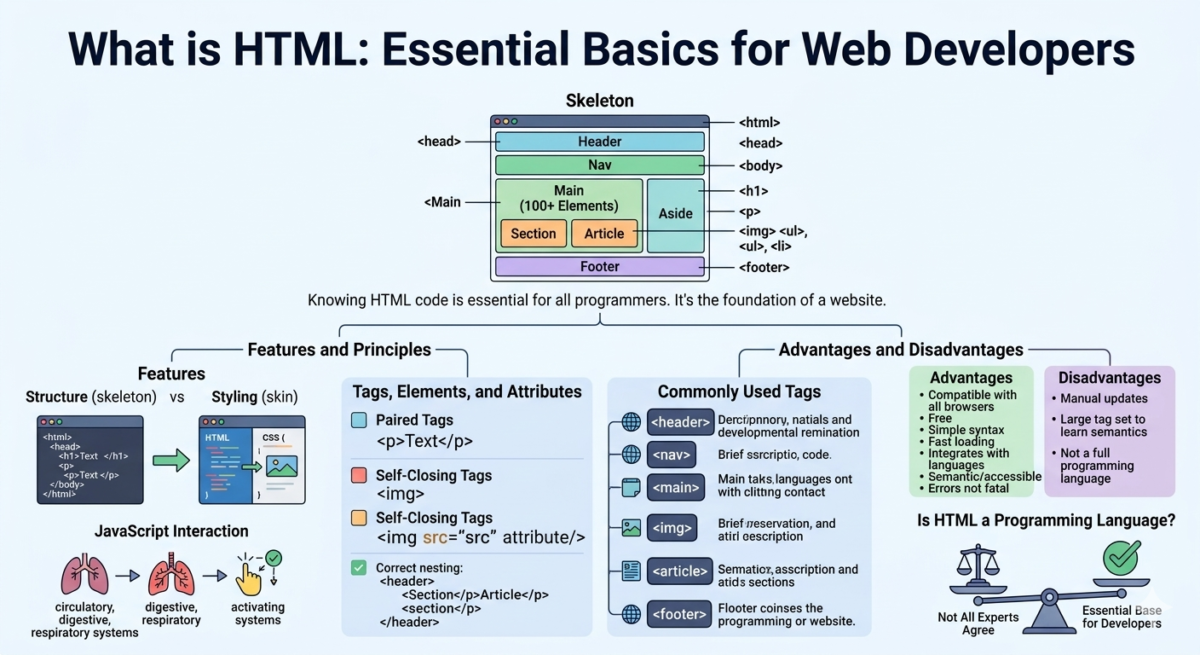
Table of Contents
What is HTML?
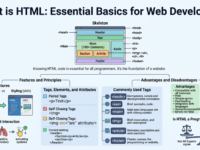
HyperText Markup Language (HTML) is the code that helps structure the content of each web page. Using HTML, the developer builds the “skeleton.” Then, they use CSS code to style the page—covering it with “skin.” Finally, they activate the “circulatory, digestive, and respiratory systems” using JavaScript.
What is HTML language:
● HyperText (hypertext) is text that connects related elements.
● Markup is a style guide for typesetting.
● Language – the code that a computer system understands and uses to interpret commands.
The HTML code of the Google Doc in which this material is written
Why do we need HTML?
Using HTML markup language, the browser makes a request to the address entered by the user and receives a file in “.html” format. The browser recognizes the code and selects familiar cues: it understands what to write in words, where to place the heading, and which one. Thus, the code from the file is converted into the required visual objects.
If you’re on a laptop or computer right now, take a look at what the HTML of this particular blog page looks like.
To do this, in Safari, check the box next to “Show Develop menu in menu bar” in “Advanced.” Then, click “Develop” in the browser and then “Show Page Resources.”
For Google Chrome, right-click anywhere and select “View Page Source.” The commands may vary depending on the browser.
HTML code for the “Web Developer” course page of Yandex Workshop
HTML capabilities
HTML helps structure information. These include commands to add an image, break text into paragraphs, add headings and subheadings, create a list, insert a table, or draw an element. The page layout will look exactly as the developer coded it.
What is HTML: a set of commands that, after processing, are transformed into a visual representation. A command is a tag consisting of a name placed between the “less than” and “greater than” symbols (< h 1>). There are paired tags. Each has its own nesting rules. For example, this is what a line in a list looks like:
< u l>
< l i> The name of the item in the list </ l i>
</ u l>
An unclosed or incorrectly closed tag can cause the layout to break.
A simple HTML page consists of three tags: <html>, <head>, and <body>. <head> and <body> are used only once in a document.
<html> appears in a document immediately after the “doctype”—the document type designation. This is how the browser determines the HTML version and how to properly display the page.
<head> stores important service information – the page title and encoding.
<body> contains the page content. This is how the code is displayed in the browser. Text and images are added inside this tag.
Let’s look at some of the other most commonly used HTML tags.
<header> defines the introductory portion of a web page. It contains the logo, navigation elements, and a search bar.
<nаv> controls navigation elements: contacts, information, frequently asked questions, and more.
<main> contains the main sections of an HTML document, excluding <header> and <footer> . Ideally, it is used only once in the entire HTML document.
<іmg> helps add an image, but it’s meaningless on its own. We need to specify the URL leading to the image inside. This is done using the src attribute:
< і mg src=”address”>
<art і cle> structures information by working with a combination of text, images, and video.
<sect і on> defines a specific section of a web page. This could be a “Showcase,” “About Us,” “Contact Us,” or other section.
The code for a simple page looks like this:
<html>
<head>
<title>
Page title
</title>
</head>
<body>
<header>
<h1>Heading </ h 1>
<main>
<article>
Text
</article>
</section><nаv>
< u l>
<l i > Heading 1 </ l i>
<l i > Heading 2 </ l i>
<l i > Heading 3 </ l i>
</ u l>
<nаv>
</header></body>
</ h tml>
Tags convey actual meaning—elements aren’t automatically placed where they should be. That’s done with CSS.
Advantages and Disadvantages of HTML
Is HTML a programming language?
HTML’s capabilities are very limited. Not all experts consider it a programming language. Essentially, HTML is code that helps a browser display a website’s content correctly.
HTML is essential for anyone planning to work in development. You can learn the basics in a couple of hours. One of the best practices is to modify the code on the source page and see what happens. Only after you’ve practiced creating simple pages and mastered the basics of HTML should you move on to more complex programming languages.
The professional layout course will teach you the basics of HTML and CSS. From the very first lessons, you’ll learn the basics of layout and create and edit HTML code using a dedicated simulator.