What is an SSD?
An SSD is a device that stores data, usually inside your computer. These storage drives offer significantly better speeds and latency than HDDs, the traditional hard drives. You can easily measure the performance of an SSD with programs like CrystalDiskMark. The acronym SSD stands for Solid State Disk, referring to devices that have no internal mechanical components, unlike HDDs. Modern SSDs use either the computer’s SATA or PCIe bus, with the latter being faster than the former because a standard SSD experiences a bottleneck at the SATA bus, as SSDs offer significantly higher speeds than the SATA 3 bus.
SSDs currently operate using 3D NAND flash memory chips. Each manufacturer has its own technologies to improve the stacking of these chips (hence the “3D” designation), and only a few companies manufacture the chips themselves, selling them to other companies that assemble and sell the SSDs to users. The technology behind the development of these chips is usually based on their memory cells, resulting in QLC, TLC, MLC, and SLC SSDs, depending on whether they have 16, 8, 4, or 2 states of “ones” and “zeros” for data storage. A higher number of states results in higher latency and a greater probability of failure, as well as lower durability and price.
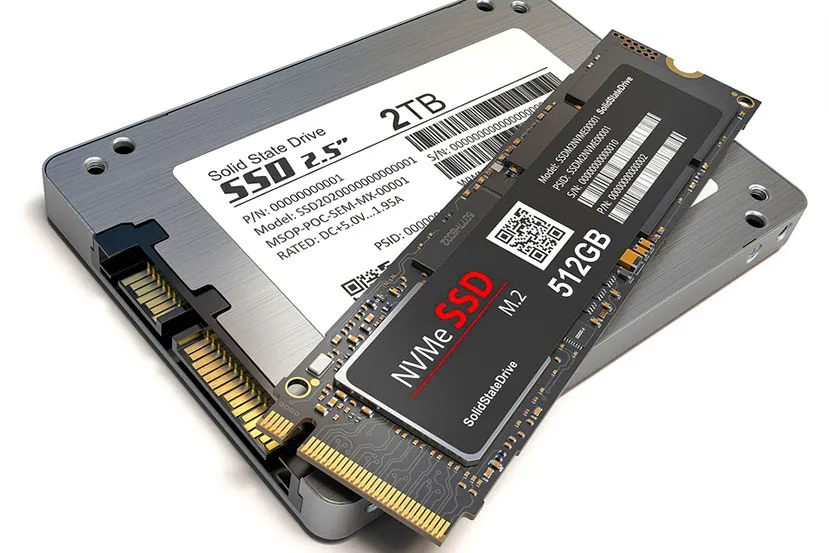
Solid-state drives (SSDs) are available in many form factors today. These range from the standard 2.5″ form factor (which uses the SATA bus) to the NGFF form factor (PCIe bus), also known as M.2. Within the latter, the designation refers to the drive’s dimensions (width and height), such as M.2 2280, which is 22 mm wide and 80 mm high. M.2 SSDs are available in sizes ranging from 2230 to 22110, with varying lengths but always the same width, although the M.2 2280 form factor is the most common .
What is an SSD used for?
An SSD is used to store data. The main reason for choosing an SSD over an HDD is that it significantly improves the overall speed of your computer. If your computer has an HDD, adding an SSD and installing your operating system and frequently used applications/games on it will result in a noticeable performance boost. Between this and the fact that prices are constantly decreasing as more manufacturers begin developing them, the replacement of HDDs is inevitable over time.
To give you an idea, a standard HDD reaches a maximum sequential read speed of around 150 MB/s, while a SATA SSD reaches 500 MB/s. If we now compare this to a PCIe 3.0 SSD, the figure is around 1500 MB/s, and with the latest PCIe 4.0 SSDs, we’re looking at 4000 MB/s and above. The comparison with latencies is much the same; the NVMe protocol behind the PCIe bus offers minimal latencies, which an HDD will never achieve.
SSDs are significantly smaller than HDDs, with a few exceptions such as 32 TB models that require considerable length. An SSD also consumes much less power than an HDD, produces virtually no noise (due to the absence of moving parts), and greatly improves latency (also due to the lack of moving parts). However, the price per GB (in Euros) is higher for SSDs than for HDDs. Over time, prices are stabilizing towards a minimum, making it possible for any user building or buying a computer to incorporate an SSD without a noticeable increase in cost.
On the other hand, SSDs enjoy the same RAID options as HDDs, meaning that several of them can be configured simultaneously to offer better speeds (RAID0) or security (RAID1), among other things.
About the Author