What is a socket?
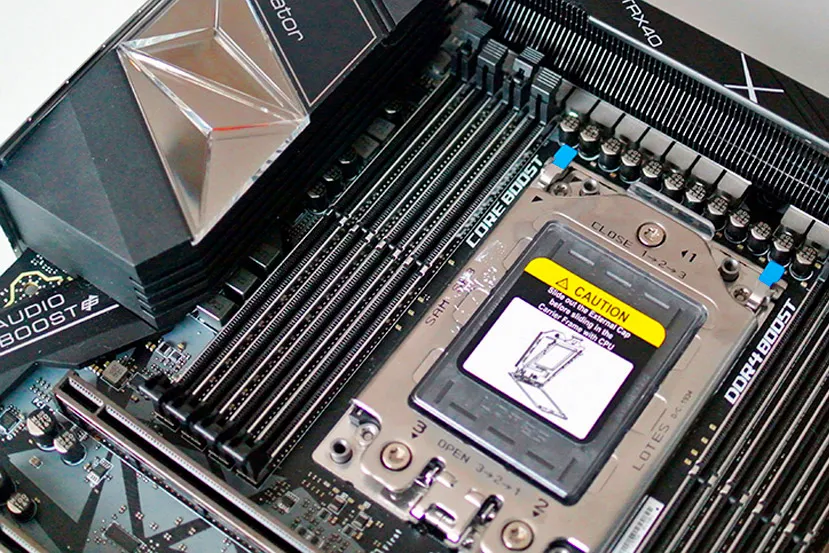
The motherboard socket is where the processor is installed. Whether it’s AMD or Intel, the socket is the only place where a processor can be installed on a motherboard, and there are many different socket types. The motherboard socket determines the type of processor that can be installed, as this component cannot be modified to make it compatible with processors for which it wasn’t designed. On an ATX motherboard, the socket is located at the top and centered, right between the external connectors and the DIMM slots for RAM. Other form factors, such as Mini-ITX, may have different socket layouts.
Virtually every new processor architecture introduces a new socket, which is usually incompatible with previous sockets. An interesting fact about sockets is that, in the case of AMD, the socket itself incorporates the holes where the processor pins are inserted, while in Intel it’s the other way around: the socket incorporates the pins, and the processor only has the flat connections. If a pin on the socket or the processor is damaged, it’s possible that, with a good amount of luck, it might continue to function normally, but the general rule is that the component will be rendered unusable.
A motherboard socket for a desktop computer is designated, in the case of Intel, by the acronym LGA (Land Grid Array) followed by four numbers; these numbers indicate the number of pins the socket has. AMD uses a different approach, instead of the acronym PGA (Pin Grid Array), which refers to its sockets. Instead, it uses letters and numbers: AM3, FM2, AM4, TR4, TRX40, etc.
Table of Contents
ToggleWhat is a socket used for?
Sockets are used to connect the processor to the motherboard and, therefore, to the rest of the components. They are delicate and require careful handling when installing the processor, whether it’s AMD or Intel. Once installed, the pins will make the necessary connection and provide the means by which the processor communicates with the motherboard and everything else installed on it.
The inclusion of LGA (Intel, pinless) and PGA (AMD, pinned) sockets on motherboards provides users with great versatility when upgrading their PCs, as it allows for processor replacement. Therefore, this type of socket also helps define the expansion options available to users when purchasing a motherboard. However, other types of sockets, such as BGA, have the processor soldered to them, making replacement impossible. This type of socket is commonly found in barebones and very small mini PCs. Many other sockets also leave the processor soldered, such as those used in servers and more specialized environments where everything has been studied and optimized to work best with specific processors, making processor replacement counterproductive.
On the back of a motherboard, you’ll find a prominent area filled with components; this is where the CPU socket is located. When installing CPU coolers (air or liquid), this area is covered with specific cooler components, creating a solid structure between the two sides of the motherboard. This provides greater rigidity to the socket area, as it must support a significant amount of weight, especially in the case of air coolers.
About the Author

BuzzBongo Tech Team
Administrator
The BuzzBongo Tech Team is composed of seasoned professionals with decades of combined experience in hardware analysis, software architecture, and digital journalism. We don’t just report on the latest gadgets; we live, breathe, and stress-test them. Our team is driven by a singular passion: ensuring that our readers have the honest, impartial, and expert-level information they need to navigate the rapidly evolving tech landscape.https://www.buzzbongo.com/buzzbongo-tech-team