
Have you ever stopped to think about how a touchscreen monitor works?
Over the past two decades, touchscreens have revolutionized the way we interact with various electronic devices, including some types of monitors.
You may not even have a touchscreen monitor at home, but you’ve certainly interacted with one: whether at a self-checkout counter in a point of sale, at self-service kiosks, or even in a museum.
If you’re curious to understand how this device works, follow today’s article prepared by the Victor Vision team — your technology experts.
Let’s explain how a touchscreen monitor works, its advantages, applications, and some other interesting facts.
Enjoy your reading!
What is a touchscreen monitor?
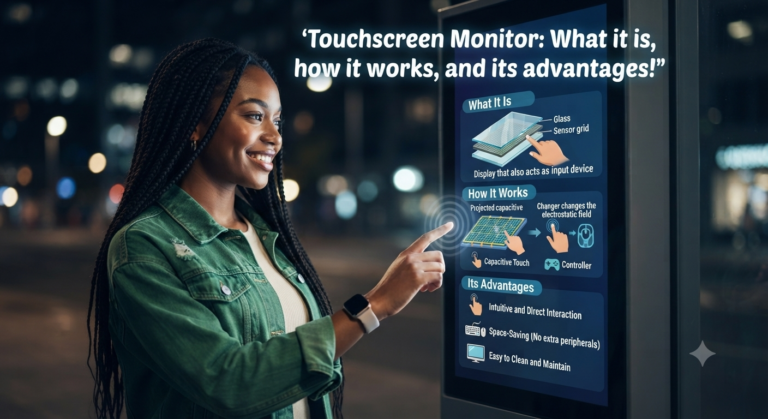
A touchscreen monitor is a type of display device that allows direct user interaction with the interface. Therefore, the need for input peripherals, such as a keyboard or mouse, is eliminated.
These monitors have a touch-sensitive surface that can detect pressure or finger touches.
This feature allows the user to perform actions such as clicking, dragging, tapping, and swiping directly on the screen.
What is a touchscreen?

Translated into Portuguese as “tela sensível ao toque” (touch screen), the term touch screen refers to a type of electronic display capable of detecting inputs through touches on the screen.
For most commonly used touchscreens, touch inputs are detected using the electrical properties of the human body, since the human body is an electrical conductor.
This conductivity allows the device to recognize and register our touch as an input.
How does a touchscreen work?
Touchscreens operate on principles that integrate human touch with electronic device responses.
There are several technologies behind these screens, but two of the most common are resistive and capacitive.
Resistive touchscreens consist of several layers, including two conductive and transparent layers that, when pressed together, come into contact with each other.
This pressure creates a change in the electrical current, and the device is able to register the exact position of the touch.
Although sensitive to the touch of any object, the outermost layer is made of polymer, which can make it more susceptible to scratches and wear over time.
Furthermore, this type of screen offers less transparency and does not allow for multitouch.
On the other hand, capacitive screens are composed of the conductive material indium tin oxide arranged in a geometry of small capacitors that store electrical charge.
When a finger touches the screen, there is a small transfer of charge to the point of contact.
The device measures the change in charge at various points on the screen to determine the exact location of the touch.
This type of screen stands out for its high sensitivity and ability to recognize multiple touch points simultaneously – known as multitouch.
Regardless of the technology used, they all transform a simple tactile gesture into an electrical signal that is interpreted by the device’s hardware and software.
What is the purpose of touchscreen technology in a monitor?
Touchscreen technology in monitors aims to offer a more intuitive, interactive, and simple user interface.
It is quite useful in educational applications, interactive presentations, and in sectors such as retail and automation. Some examples of the technology’s usability are:
- Mobile Devices: Smartphones and tablets are perhaps the best-known examples of the use of touch screens, allowing users to navigate, type, and interact with applications through tactile gestures.
- Point of Sale (POS) systems: POS equipment with touch technology is common in restaurants and retail stores, where it simplifies the transaction process for both customers and employees.
- ATMs: Banks use touch screen monitors in ATMs to facilitate withdrawals, deposits, and other financial transactions.
- Automotive Infotainment: Infotainment systems in modern vehicles use touchscreens to control navigation, audio, vehicle settings, and smartphone connectivity.
- Digital Signage and Kiosks: Information kiosks, airport check-in counters, and signage panels in public places utilize touch screens to provide self-service interactions.
For example, at the supermarket, when scanning your purchases at a self-checkout machine, the touch-sensitive monitor helps make the process much simpler and more dynamic.
Of course, the level of relevance of a touchscreen monitor varies depending on the context in which it is used.
How does a touchscreen work?
There are two types of touchscreens: resistive and capacitive.
As you will see below, they work in different ways.
Resistive touchscreens have several overlapping layers, with the outer layer made of a flexible, touch-sensitive material.
When we touch the screen, the flexible layers come into contact, causing a change in the electrical current.
Then, a controller reads the changes in current and determines the location of the touch.
Capacitive screens are the most widely used in modern devices. They consist of a layer of glass covered by a transparent conductive coating.
When we touch the screen, our finger conducts a small amount of electrical charge, which is detected by capacitive sensors that determine the position of the touch.
Generally, capacitive screens offer greater precision and a faster response compared to resistive screens.
If you are reading this article on a smartphone, you are probably interacting with a capacitive screen.
What are the advantages of a touchscreen monitor?
In addition to saving space, touchscreen monitors offer a number of advantages over traditional monitors. Check out the main ones below:
- Direct interaction: One of the main advantages of a touchscreen monitor is that users can directly touch the screen to perform actions, that is, interact directly with the touchscreen interface. Thus, as we have seen previously, we can dispense with mice and keyboards.
- Ease of use: Have you noticed how quickly children learn to use their little fingers on screens? That’s because most people, regardless of their experience with technological devices, can learn how to interact with a touchscreen very quickly. This is because the device is quite intuitive. This characteristic considerably reduces the learning curve and makes devices more accessible to different user profiles—from the youngest to the most experienced.
- Efficiency: Precisely because of its ease of use and direct interaction, this type of monitor enables more efficient interactions, which is essential in some environments. For example, in medical, industrial, or self-service terminal environments, the time factor can be decisive—on different scales, of course.
- Versatility: Versatility is another advantage, as this type of monitor can be used for countless tasks. For example, touchscreen monitors can be used for browsing the internet, editing images, videos, and graphic content, playing games, watching videos, and much more.
- User engagement: Leaving aside the fact that we are spending more and more time in front of interactive screens, such as smartphones and computers, touchscreen monitors can be very useful in other contexts. For example, in professional presentations, educational environments, or interactive museums.
These are some of the main advantages of a touchscreen monitor. However, depending on the type of screen chosen, other benefits are possible.
Where is a touchscreen monitor used?
Highly versatile, touchscreen monitors can be used in a variety of applications. Let’s explore some of them:
- Point of Sale (POS): in cash register systems and payment terminals;
- Information kiosks: in public places, shopping malls, museums, among others;
- Education: in schools, educational institutions, and laboratories;
- Industrial Control: used in industrial environments for controlling machines and processes;
- Telecommunications: in customer service systems, such as public telephones or self-service applications;
- Healthcare: very common in medical settings for quick access to information and interaction with medical equipment;
- Entertainment: in games and interactive entertainment, such as arcades and theme park attractions;
- Mobile devices: tablets, smartphones and monitors themselves;
- Domestic applications: devices such as home automation control panels and smart home appliances.
What is the difference between a touchscreen and a display?
It’s quite common to think that a display and a touchscreen are the same thing, which isn’t necessarily a problem. However, a screen and a display are different items.
A touchscreen is a touch-sensitive surface that allows for direct user interaction.
This screen recognizes and responds to the user’s touches, gestures, or pressure, and also acts as a protective film for the display.
The display, in turn, is the set of electronic components that enable the display of images.
In other words, these are all the components that make it possible to display images on the screen.
How do I activate the monitor’s touchscreen?
If you have a hybrid monitor where you can turn the touchscreen on or off, but you don’t know how to do it, we’ve prepared a quick step-by-step guide to help you.
But be aware that this configuration may vary depending on the monitor model and brand. However, the procedure is generally as follows:
- Connect the monitor to the computer using an HDMI or DisplayPort cable;
- On the home screen, open Device Manager;
- Expand the “Human Interface Devices” category;
- Double-click on “HID-compliant touch screen”;
- In the “General” tab, select the “Enabled” option;
- Click “OK”.
What to do if your touchscreen monitor isn’t working?
When your touchscreen monitor stops working properly, the frustration can be immense.
However, there are some actions you can take to try to resolve the problem.
First, it’s important to check that the power cord and any other connecting cables are properly connected and in good condition.
Sometimes, simply adjusting or reconnecting the wires is enough to restore the monitor’s functionality.
If the cables are correctly connected, restarting the device can be a helpful step. Turn off your monitor, wait a few seconds, and then turn it back on.
This may resolve temporary system glitches affecting the screen. Don’t forget to check your operating system settings.
If possible, update your touchscreen monitor drivers, as outdated or corrupted drivers are often the cause of malfunctions.
Cleaning the screen is another point that deserves attention. Stains, dirt, or liquids can prevent proper touch detection, so be sure to clean the surface with appropriate materials.
If the problem persists, it is important to seek technical support or consider the possibility that the hardware may be faulty, which may require special repair.
How to choose a touchscreen monitor?

Generally speaking, the choice of a touchscreen monitor depends on the specific needs of each user.
Ultimately, what will be the purpose of this device? Consider that the ideal monitor for a home automation system will hardly be the same as an interactive monitor for a museum.
Therefore, we can say that the factors to be considered include the type of application, the budget, and personal preferences.
Need help finding smart displays? Talk to the buzzbongo team and find out how we can help with your projects!
What differentiates a touchscreen from regular screens?
The fundamental difference between touch screens and regular screens lies in their ability for direct interactivity.
While a traditional screen requires the use of external input devices such as a keyboard and mouse, a touchscreen allows the user to interact through touch.
This tactile interaction is possible thanks to the technology incorporated into touchscreens, which can be capacitive, resistive, infrared, among others.
This technology senses physical contact and translates it into commands that are interpreted by the device’s operating system.
The touchscreen interface provides a more intuitive and natural experience for the user, who can touch, swipe, zoom, and perform other actions on the screen surface.
In addition, touchscreens often support multi-touch functionality, which recognizes multiple simultaneous contact points, allowing for complex gestures and smoother navigation.
This level of interactivity results in more efficient and dynamic use, favoring applications where speed and ease of use are essential.
Whether in personal devices such as smartphones and tablets, or in commercial and industrial applications, touch screens offer clear advantages over conventional screens.
Conclusion
So, is everything clear about the touchscreen monitor, its applications, and how it works?
This type of monitor is one of the best choices for users seeking a more intuitive, interactive, and simple interface, precisely because of its practicality and ease of use.
If you found this article helpful, please share it! Don’t forget to visit the buzzbongo blog to check out other related content.
Follow us on our YouTube channel and stay up-to-date on the latest news and innovations in the world of technology.
About the Author