
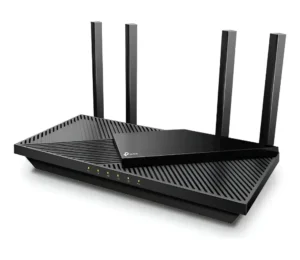
The right router can transform your browsing experience, ensuring fast, stable, and secure connections. In this guide, you’ll learn about the main types of routers, their features, how to configure them, and of course, we’ve selected the best models available.
In an increasingly connected world, the importance of a good router cannot be underestimated. Whether for remote work, online gaming, watching high-definition videos, or simply browsing the internet, a quality router is essential. But with so many options available, how do you choose the best router for your needs? Let’s explore this in detail so you can make an informed choice and ensure the best internet experience at your home or office.
How do routers work?
A router is a device that connects your local network (such as your home Wi-Fi network) to the internet. It acts as an intermediary, transmitting data between your devices (such as smartphones, laptops, smart TVs) and the internet. And to understand how to choose the best router, it’s necessary to first understand how they work.
The basic operation of a router involves receiving the internet signal from your service provider and distributing that signal to your devices. This is done via Ethernet cables or, more commonly, through a Wi-Fi signal, which allows for wireless connection.
In addition, routers also perform crucial functions such as traffic management (prioritizing certain devices or types of use), security (protection against unauthorized access and cyberattacks), and bandwidth control (ensuring that all devices have a stable connection).
Types and uses of routers
When it comes to choosing a router, it’s essential to understand that not all models are created equal. Each type of router caters to different needs and situations, and choosing the right type can have a significant impact on the quality and stability of your internet connection.
Single-band routers
Single-band routers operate exclusively on the 2.4 GHz frequency. This frequency is widely used and offers a good combination of range and signal penetration, making it ideal for covering large areas or penetrating walls and other obstacles. However, because it is so popular, the 2.4 GHz frequency is also more susceptible to interference from other devices, such as cordless phones, microwaves, and even other nearby Wi-Fi networks.
Ideal use: Single-band routers are best suited for users with basic internet needs, such as web browsing, social media access, and standard-definition video streaming. They are an affordable and reliable option for small apartments or houses with few connected devices.
Dual-band routers
Dual-band routers operate on two frequencies: 2.4 GHz and 5 GHz. The 5 GHz frequency offers faster speeds and less interference, making it ideal for activities that demand higher bandwidth, such as high-definition video streaming, online gaming, and video calls. The main advantage of dual-band routers is the flexibility they offer, allowing older devices to connect to the 2.4 GHz band while newer, more demanding devices utilize the 5 GHz band.
Ideal use: Dual-band routers are perfect for homes with multiple connected devices, where different types of usage occur simultaneously. If you live in a house with gamers, video streamers, and people who work remotely, a dual-band router can efficiently manage these demands, ensuring a stable and fast connection for everyone.
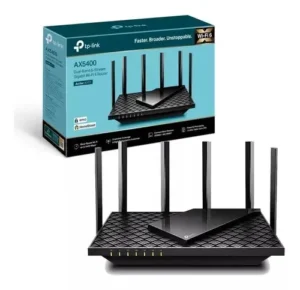
TP-LINK AX5400
Triple-band routers
Tri-band routers go a step further, adding a third 5 GHz band. This means they operate on one 2.4 GHz frequency and two 5 GHz frequencies simultaneously. This third band is especially useful in highly connected homes, where many devices compete for bandwidth at the same time. With an extra band, it’s possible to distribute the traffic load more efficiently, avoiding congestion and ensuring that each device has the best possible connection.
Ideal use: These routers are ideal for large homes or environments where several people use the internet intensively at the same time. If you have a home with many smart devices, such as security cameras, voice assistants, and a very active streaming and gaming network, a tri-band router may be the best choice to ensure everyone has a smooth and uninterrupted connection.
Mesh routers
Mesh routers are designed to solve a common problem: Wi-Fi dead zones. Instead of relying on a single device to cover the entire house, mesh systems utilize multiple interconnected devices that communicate with each other to create a unified Wi-Fi network. These devices, called “nodes,” can be spread throughout the house, ensuring that every corner receives a strong and stable signal.
One of the biggest advantages of mesh systems is the ease of expansion. If you notice that a specific room is not yet receiving a strong signal, simply add a new node to the existing mesh network.
Ideal Use: Mesh routers are ideal for large homes, multi-story houses, or any environment where traditional Wi-Fi coverage is insufficient. They are also perfect for users who don’t want to worry about managing signal repeaters or separate Wi-Fi networks.
Gaming routers
Gaming routers are designed with a clear focus: reducing latency and ensuring the fastest and most stable connection possible for online gaming. They come equipped with advanced features such as QoS (Quality of Service), which allows prioritizing game traffic over other network activities. This means that even if someone is streaming videos or downloading large files, your online game will not suffer from lag or connection drops.
In addition, many gaming routers offer tools to monitor and adjust network performance in real time, ensuring you have complete control over your gaming experience.
Ideal use: Competitive online gamers will benefit from a gaming router. These routers are designed to provide the lowest possible latency, which can be the difference between winning or losing a match.
Routers for smart homes
With the growth of smart homes, where lights, thermostats, locks, and other devices are connected to the internet, the demand for routers capable of managing these connections has increased. Routers designed for smart homes offer features such as compatibility with Alexa or Google Assistant, separate networks for IoT (Internet of Things) devices, and enhanced security controls to protect vulnerable devices.
Ideal use: If you have many smart devices in your home, from connected light bulbs to security systems, a router designed for smart homes can provide a more stable and secure connection for all your devices.
Configuration and use
Setting up a router might seem daunting, but with the right instructions, the process is straightforward. Here are the general steps for setting up most routers:
- Choose the ideal location: place the router in a central location to ensure the best Wi-Fi coverage. Avoid areas near devices that may cause interference, such as microwaves and cordless phones.
- Connect the cables: Connect the modem cable to the router via the WAN/Internet port, and then connect the router to a power source.
- Access the router’s interface: Use an internet browser to access the router’s configuration interface. This is usually done by typing an IP address into the address bar (for example, 192.168.1.1).
- Set up your Wi-Fi network name and password: Give your network a name (SSID) and create a strong password. This information will be used to connect your devices to the network.
- Adjust advanced settings: depending on your router model, you can adjust settings such as QoS, parental controls, and security. These options allow you to customize the network according to your needs.
- Update the firmware: Check for available firmware updates for your router. Updating the firmware can improve performance and security.
- Connect your devices: After setting up the router, you can start connecting your devices to the new Wi-Fi network.
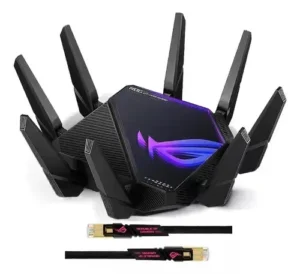
ASUS ROG RAPTURE GT AXE11000
The top 10 best routers
Each router offers a specific set of features that can meet different connectivity needs, from basic browsing to intensive online gaming and complex smart homes.
TP-Link Archer AX73: best value for money
The TP-Link Archer AX73 is an excellent choice for those seeking a Wi-Fi 6 router with great value for money. Equipped with Wi-Fi 6 (802.11ax) technology, this router offers speeds of up to 5400 Mbps, making it ideal for streaming 4K videos, online gaming, and multiple simultaneous connections. It also features six high-performance antennas that ensure wide and stable coverage, even in large homes.
In addition, the Archer AX73 includes features such as QoS, which allows prioritizing internet traffic to different devices, and WPA3 security, which offers additional protection against cyber threats.
Ideal for: families or users who need high speed and a reliable connection across multiple devices, without having to spend a lot.
ASUS RT-AX88U: for gamers and connected homes
The ASUS RT-AX88U is a top-of-the-line router, specially designed for users who demand maximum performance from their Wi-Fi connection. Supporting Wi-Fi 6, this router offers speeds of up to 6000 Mbps and is equipped with 8 LAN ports.
Gigabit, which allow you to connect various devices via cable, ideal for gamers and streamers.
The RT-AX88U also comes with Adaptive QoS technology , which allows you to prioritize network traffic for gaming, ensuring a smooth and uninterrupted online experience. In addition, it features AiProtection Pro, a network security suite that protects all connected devices from online threats.
Ideal for: pro gamers, streamers, and homes with many connected devices that require a high-performance connection.
Google Nest Wi-Fi: the best mesh system
Google Nest Wi-Fi is an excellent choice for those who need complete Wi-Fi coverage throughout their home. This mesh system is easy to set up and manage using the intuitive Google Home app. Each Google Nest Wi-Fi point also functions as a smart speaker with Google Assistant built-in, making it a useful addition to a smart home.
With Google Nest Wi-Fi, you can cover an area of up to 220 square meters with just one router and an additional access point. The system is scalable, meaning you can add more access points as needed to expand coverage.
Ideal for: large homes or offices that need reliable Wi-Fi coverage in every corner, and for those who value smart home integration.
Netgear Nighthawk XR500: the best router for gaming
If you’re looking for the best possible performance for online gaming, the Netgear
The Nighthawk XR500 is hard to beat. This router was specifically designed to reduce latency and provide an uninterrupted gaming experience. Equipped with the DumaOS gaming optimization system, the XR500 offers advanced features such as Geo-Filter, which allows you to choose the closest game servers, ensuring the lowest possible ping time.
With four Gigabit LAN ports and support for high-speed Wi-Fi, the XR500 is also perfect for homes with multiple gamers or streamers, ensuring everyone has a stable and fast connection.
Ideal for: competitive gamers who need a reliable and fast connection, and for users who want maximum control over their gaming network.
Linksys EA8300 Max-Stream: High connectivity
The EA8300 Max-Stream is a tri-band router, ideal for homes with many connected devices. Featuring one 2.4 GHz band and two 5 GHz bands, this router offers combined speeds of up to 2.2 Gbps, ensuring all connected devices receive a strong and stable connection, even during intensive use.
The EA8300 is compatible with the Linksys Velop Mesh system, meaning it can be easily integrated into a larger Mesh system if needed. Additionally, it features MU-MIMO technology, which allows multiple devices to receive data simultaneously without slowing down the network.
Ideal for: large families or offices with many devices connected simultaneously, such as smartphones,tablets, laptops, and smart devices.
D-Link DIR-882: for those on a budget.
For those who need a reliable router but have a limited budget, the D-Link DIR-882 is an excellent option. This dual-band router offers combined speeds of up to 2600 Mbps, which is more than enough for streaming high-definition videos, online gaming, and web browsing.
The DIR-882 also comes with Gigabit Ethernet ports for fast and stable wired connections, as well as QoS support, which helps prioritize network traffic for critical activities. Its configuration is simple and can be done through a user-friendly interface.
Ideal for: users who need a high-quality router for everyday tasks, but don’t want to spend too much.
Ubiquiti UniFi Dream Machine: for professionals and small businesses
UniFi Dream Machine is more than just a router; it’s a complete network solution that includes a router, switch, access point, and security controller, all in a single device. This router is ideal for small businesses or advanced users who want complete control over their network.
With support for Wi-Fi 5 and the ability to manage an entire network with the interface.
The Dream Machine is a powerful choice for those who need a scalable and robust network. It also offers advanced security features and can be easily integrated with other UniFi devices to expand the network as needed.
Ideal for: small businesses, home offices, or IT professionals who need a robust and scalable network solution.
ASUS ROG Rapture GT-AXE16000: Gaming Performance
The Rapture GT-AXE16000 is one of the most advanced routers released in 2024, designed for gamers who demand maximum performance. This model is the world’s first quad-band 6E Wi-Fi router, offering a new 6 GHz band in addition to the traditional 2.4 GHz and 5 GHz bands. This results in combined speeds that can reach 16,000 Mbps, ensuring a stable and ultra-fast connection, even in highly congested environments.
In addition, the GT-AXE16000 comes with 10 Gbps LAN ports, making it ideal for gaming setups and 4K or 8K streaming. It also includes game optimization tools such as Game Boost and Game Radar, which reduce latency and improve the gaming experience.
Ideal for: hardcore gamers who need a high-speed, low-latency connection, as well as tech enthusiasts who want the best in connectivity.
Netgear Orbi RBKE963: next-generation mesh system
The Netgear Orbi RBKE963 is the most advanced mesh system of 2024, designed to cover large homes with ultra-high-speed Wi-Fi 6E. This tri-band system with an additional 6 GHz band offers total speeds of up to 10.8 Gbps, ensuring that all devices in your home or office have a fast and reliable connection.
With the ability to cover up to 800 square meters with a single kit (router and two satellites), the Orbi RBKE963 is ideal for large homes or environments where complete and uniform coverage is essential. It also supports more than 100 devices connected simultaneously, perfect for smart homes with many IoT devices.
Ideal for: large homes or commercial spaces that need extensive and reliable Wi-Fi coverage, as well as users who want the latest Mesh technology.
Linksys Hydra Pro 6E: speed and reliability
The Linksys Hydra Pro 6E is a tri-band 6E Wi-Fi router that offers a balanced combination of speed, coverage, and reliability. This router is designed to support speeds up to 9.6 Gbps, utilizing the new 6 GHz band to minimize interference and maximize available bandwidth for your devices.
Equipped with MU-MIMO and OFDMA technology, the Hydra Pro 6E can manage multiple devices simultaneously without compromising performance. It also comes with Linksys Intelligent Mesh, which allows you to expand coverage as needed, seamlessly integrating with other Linksys Mesh products.
Ideal for: large families or professionals who need a fast and reliable Wi-Fi connection, especially in smart homes or offices with many connected devices.
Conclusion
Choosing the right router can make all the difference in your internet experience. Whether you’re a hardcore gamer, a remote worker, or just someone who wants to watch high-definition videos without interruptions, there’s a perfect router for you. By considering your specific needs, the size of your home, the number of connected devices, and your budget, you can find the ideal router that will provide a fast, stable, and secure connection.
Want to improve your internet connection quality? With a good router, faster, more stable, and secure internet is just a click away!
About the Author