

If you are comparing TP-Link router models for your home or business, there are some criteria that should be analyzed . Consider the Wi-Fi standard (Wi-Fi 6/AX or Wi-Fi 5/AC), the total speed, the port type, and whether you need a Mesh network (Deco line) or a traditional router (Archer line).
With this information in hand, it’s possible to better understand the specifications of each model and assess whether it will be able to deliver all the speeds needed for your internet plan. To see how this works in practice, we’ve prepared a direct comparison between the Archer (AX and AC) and Deco (Mesh) lines to help you identify the right model for your home .
Comparison: Wi-Fi 6 routers
The Archer AX line is the choice for those seeking the latest internet connectivity technology . The models are ideal for high-speed internet plans (+300 Mbps), 4K/8K streaming, online gaming, and homes with many smart devices. Check out a comparison between the models.
Archer AX72/AX73 (high performance)
The Archer AX73 (or AX72, which is very similar) is a high-performance Wi-Fi 6 router , focused on users who demand the most from their network. With 6 antennas and high speed (AX5400), it is designed to handle dozens of simultaneous devices without experiencing slowdowns.
- Standard: Wi-Fi 6 (AX5400).
- Speed (bands): Up to 4804 Mbps on 5 GHz + 574 Mbps on 2.4 GHz.
- Ports: 1 Gigabit WAN + 4 Gigabit LAN.
- Features: 6 antennas, OneMesh, OFDMA, MU-MIMO 4×4, Triple-Core CPU.
- Ideal for: internet plans above 500 Mbps, large homes, gamers, and intensive 4K/8K streaming.
Archer AX55 (balance and speed)
The Archer AX55 is often considered the “balance point” of Wi-Fi 6. It offers excellent speed (AX3000), which is more than enough for most home internet plans (up to 1 Gigabit), and great device connectivity .
- Standard: Wi-Fi 6 (AX3000).
- Speed (bands): up to 2402 Mbps on 5 GHz + 574 Mbps on 2.4 GHz.
- Ports: 1 Gigabit WAN + 4 Gigabit LAN.
- Features: 4 antennas, OneMesh, OFDMA, MU-MIMO.
- Ideal for: plans from 300 Mbps to 1 Gigabit, 4K streaming, and homes with many devices.
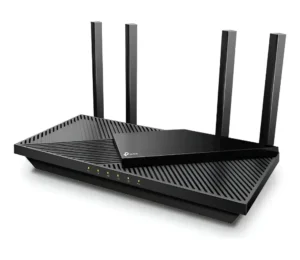
TP-Link Archer AX55 Router
Archer AX10 vs AX23 (Wi-Fi 6 entry)
The Archer AX10 and AX23 are the gateways to Wi-Fi 6. Both are rated AX1500 and offer Gigabit ports, ensuring you get the full speed of plans up to 1 Gigabit (wired). The difference between them is subtle; the AX23 is a slightly newer revision with a more powerful processor, improving connection stability. Both are significant upgrades if you’re coming from an older AC router.
- Standard: Wi-Fi 6 (AX1500).
- Speed (Bands): up to 1201 Mbps on 5 GHz + 300 Mbps on 2.4 GHz.
- Ports: 1 Gigabit WAN + 4 Gigabit LAN.
- Features: 4 antennas, OFDMA, (OneMesh usually on AX23).
- Ideal for: plans up to 500 Mbps, being the most affordable option for having Wi-Fi 6 and Gigabit ports.
Comparison: Wi-Fi 5 routers (Archer AC)
If your budget is more limited or your internet usage is more moderate (plans up to 300 Mbps and fewer devices), the Archer AC (Wi-Fi 5) line offers excellent options . The point to consider here is the ports.
Archer C80 (high performance AC)
The Archer C80 is one of TP-Link’s most powerful Wi-Fi 5 routers . Its speed (AC1900) and 3×3 MU-MIMO technology (which allows communication with 3 devices simultaneously) place it above basic AC1200 models, offering better performance on networks with more traffic.
- Standard: Wi-Fi 5 (AC1900).
- Speed (bands): Up to 1300 Mbps on 5 GHz + 600 Mbps on 2.4 GHz.
- Ports: 1 Gigabit WAN + 4 Gigabit LAN.
- Features: 4 antennas, 3×3 MU-MIMO, Beamforming.
- Ideal for: plans up to 500 Mbps that don’t require Wi-Fi 6.
Comparison: Mesh systems (Deco line)
For large houses with multiple floors or many walls, a single (even powerful) router may not be enough. The Deco (Mesh) line solves the coverage problem by spreading the signal to multiple points . Check out the comparison between models below.
Deco X50 (Wi-Fi 6) vs Deco M4 (Wi-Fi 5)
The choice here is between the latest technology (X50) and the most popular (M4) . The Deco M4 (AC1200) is TP-Link’s best-selling Mesh Wi-Fi 5 solution, solving coverage problems in plans up to 300-500 Mbps with excellent cost-effectiveness.
Deco X50(AX3000) is the Wi-Fi 6 version. It offers superior speeds, ideal for those with internet plans above 500 Mbps and who want full Mesh coverage.
Deco X50 (Wi-Fi 6):
- Standard: Wi-Fi 6 Mesh (AX3000).
- Ports (per node): 3 Gigabit (WAN/LAN auto-detection).
- Features: Wide area coverage, Seamless Roaming, App Setup, AI.
- Ideal for: large homes with high-speed internet plans (+500 Mbps).
Deco M4 (Wi-Fi 5):
- Standard: Wi-Fi 5 Mesh (AC1200).
- Ports (per node): 2 Gigabit (WAN/LAN auto-detection).
- Features: Wide area coverage, Continuous Roaming, Setup via App.
- Ideal for: large homes with internet plans up to 500 Mbps.
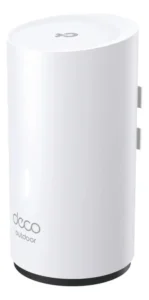
TP-Link Deco X50 Router
What makes a good TP-Link router?
TP-Link is a brand with a large portfolio, offering many different models. At the same time, with so much diversity, many names can seem confusing. However, here’s an interesting fact: these names indicate exactly what the router offers . Before comparing, it’s necessary to understand what these specifications mean and how a router works. We’ll discuss this further below.
Wi-Fi 6 (AX) vs Wi-Fi 5 (AC): the impact on speed
The main technological difference today is the Wi-Fi standard . Wi-Fi 5 (802.11ac), identified in “AC” models, is the most common standard and is still very efficient for internet plans up to 500 Mbps, making it great for streaming and daily use.
Wi-Fi 6 (802.11ax), identified in “AX” models, is the latest standard . Its advantage is not only the higher maximum speed, but also the efficiency in handling many devices connected at the same time. If your home has many Smart TVs, cell phones, virtual assistants, and computers, Wi-Fi 6 manages these connections more intelligently, reducing latency and interference.
What do the numbers AX3000 and AC1200 mean?
The number accompanying the name (AX3000, AC1200) indicates the maximum combined theoretical speed of all the router’s bands (the 2.4 GHz and 5 GHz bands). An AC1200 router, for example, offers approximately 300 Mbps on the 2.4 GHz band and 867 Mbps on the 5 GHz band.
No single device will ever reach that combined speed, but the number serves as a performance indicator . An Archer AX3000 (Wi-Fi 6) will be significantly faster and have greater capacity than an Archer AC1200 (Wi-Fi 5).
Ports (WAN/LAN) and connections (Gigabit vs Fast Ethernet)
This is one of the most important points and one that causes the most bottlenecks . If your internet plan is faster than 100 Mbps, you need a router with Gigabit ports (10/100/1000 Mbps).
Many basic routers use Fast Ethernet ports (10/100 Mbps). If you subscribe to a 300 Mbps plan and your router has Fast Ethernet ports, it will limit your internet speed to a maximum of 100 Mbps. Always check that both the WAN port (internet input) and the LAN ports (for connecting PCs and consoles) are Gigabit .
Understanding the ecosystem: Deco (Mesh) vs OneMesh
TP-Link offers two solutions for covering large areas or homes with many walls: the Deco and OneMesh systems . Understanding how each one works helps minimize problems and ensure better connections. Check out more details below to help you make your choice.
Deco Line: the dedicated Mesh solution
It’s a dedicated Mesh system . You buy a kit with two or three units (nodes) that replace your current router. They are designed to work together, creating a single network (one Wi-Fi name) throughout your home.
The advantage of Deco is “seamless roaming .” Your cell phone or laptop switches from one node to another automatically, without drops or interruptions in video calls or streaming. Setup is centralized and simplified through the Deco app.
Archer line with OneMesh: flexibility to expand
OneMesh is not a product, but a technology present in many Archer (traditional) routers. It allows you to buy an Archer router today and, if you need more coverage in the future, buy a OneMesh-compatible signal repeater .
When paired, the two create a Mesh network (with a unique name), just like Deco . The advantage is flexibility (starting with one and expanding later), but roaming may not be as seamless as with a dedicated Deco system, which was designed from the ground up for this purpose.
Find the ideal TP-Link router for your connection.
Choosing the right TP-Link router depends on your internet plan and the size of your home. For plans above 100 Mbps, prioritize models with Gigabit ports. The Archer AX (Wi-Fi 6) line is the choice for the future, while the Deco line is the ultimate solution for coverage issues.
Take advantage and explore all the options from
Visit store and ensure your network is ready for maximum speed.
About the Author