Whether for work, study, or entertainment, you often need to be connected . That’s why it’s important to have a device readily available.
Capable of providing all the necessary resources for work, personal life, or entertainment. But having a good device is useless if it’s out of battery or takes too long to charge.
So, learn, once and for all, how to quickly charge your device and, as a bonus, increase your battery life. This guide will teach you all the necessary steps to always have a smartphone Fully operational.
Turn off or reduce the number of functions on your cell phone.
The first tip is perhaps the most efficient way to speed up your cell phone battery charging: turn off the device when you plug it in to charge. The logic is simple: just being turned on already consumes energy. Therefore, turning it off can be an efficient way to get your battery to 100% faster.
However, for many professionals who depend on the smartphone
For work, turning it off may not be a viable option. In this case, the ideal is to reduce the cell phone’s energy consumption as much as possible . This can be done in the following ways:
- Closing programs
- Lowering the screen brightness
- Turning off WiFi , mobile data , and Bluetooth .
- Putting the device in airplane mode.
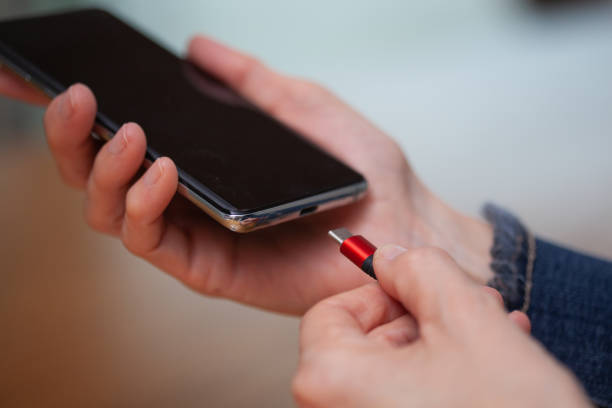
Use a quality cable.
To achieve efficient charging, investing in a quality cable can make all the difference. Therefore, when choosing a charging cable
For your mobile phone, check a few things:
Power
To determine if the connector is good, check its electrical power , measured in watts (W) . A good power output for the component should be at least 20 W
Although this is a good rate, many of the most modern chargers achieve higher numbers, such as 25W, 30W, 45W , and even 100W.
Therefore, before buying a more powerful cable, check if your cell phone is capable of handling such a high power transfer; in other words, check for compatibility . This information can be found in the product’s technical specifications or on the cable itself.
In general, most current chargers can modulate the output power according to the input power from the wall socket, preventing the cell phone from overheating or charging too slowly.

Cell phone charging cable
Take the case off your phone.
You may never have even realized it, but your cover may be hindering the process. Therefore, when choosing
the ideal coverCheck if it is exactly the right size and model for your device, otherwise:
- A poorly fitted phone case can prevent a proper connection between the charging cable and the phone’s port.
- Any distance can influence the process, even if it’s only a matter of millimeters.
- The same applies to wireless charging, which can be affected by the material of the phone case and the distance between the phone and the charger.
- A case that is too small can prevent proper heat dissipation and cause the phone to overheat , slowing down the charging speed.
Plug it into an outlet.
Another key tip for making your cell phone recharge more effectively is to always use a wall outlet whenever possible . This effectively works because a good cable can transfer more energy to the device, since a wall outlet has a higher amperage (A) than other commonly used power sources, such as laptops and portable chargers.
- Electrical outlets typically have a current rating of 10 A, but can even reach 20 A.
- USB ports can transmit from 0.5 A to 0.9 A.
- An alternative, if necessary, is to use a port on your computer. In this case, opt for the most recent one, USB 3 , which usually has a blue detail.
Avoid wireless charging.
, or also known as induction charger
It’s an alternative way to charge your phone without using cables. It works through coils that generate a magnetic charge that powers the phone’s battery.
This allows the user to keep the USB port free, enabling the use of headphones or other connectors. Although it’s a new technology with many advantages, this type of charging is a bit slower. Even so, this option is quite popular among those who own [a specific device/product – context needed] high-performance devices
.
Use turbo mode.
Many modern cell phones have a fast charging mode , also known as turbo mode. For it to work, however, your phone needs to be properly charged.
charger has power, but that’s not all:
- Check if your phone has this feature. It can usually be activated in the phone’s Settings > Battery .
- This feature modifies the phone’s charging power, increasing the charging speed.
Have a power bank on hand.
To the Power Bank or external batteries
These can be very useful for keeping your cell phone always charged. This type of product guarantees a slower but more powerful charge, making it ideal for when you need it most.
- The most modern external batteries reach capacities of up to 20,000 mAh , making it possible to charge even more than one device at a time.
- They usually have different ports , such as a mini-USB for older devices, a USB-C for current ones, and a Lightning connector for iPhones.
- Portable chargers can be used both in wall outlets and with laptops and computers, maintaining a charge for several days or weeks.

Woman plugs portable charger cable into a cell phone.
Don’t leave a woman’s cell phone charging all night.
Contrary to what was previously believed, today’s batteries can be left plugged in overnight without affecting the product’s health. This is because current batteries are made of lithium-ion and therefore effectively control the flow of energy , the so-called cycles.
- Smartphone batteries have an average estimated lifespan of 400 cycles. This is equivalent to about a year and a half.
- Today’s batteries can tell if you’ve charged them from, for example, 0% to 50%, counting only half a cycle.
- However, it’s worth noting that it’s not ideal to leave your phone charging overnight , as damage to the charger or the phone’s charging controller can cause the device to overheat.
- Among the most common problems caused by overheating is battery swelling , rendering the cell phone unusable.
- Although rare, the device can catch fire, especially if it is near flammable surfaces.
With these tips and advice, you can now feel more confident about what to do to increase your phone’s capacity and battery life . Most of the tips presented here can be applied to any deviceas a they are easy suggestions to implement in your daily routine.
About the Author