

This article will analyze the ten best process automation tools. These tools can transform how your company operates and help reduce human error. They also speed up manual tasks and provide data instantly.
Whether you’re a small startup or a large agency, investing in the best business process automation software can revolutionize your work and increase overall efficiency. So, without further ado, let’s dive into the world of automation techniques and discover the best tools available to revolutionize your company’s business operations.
Key points
- Business process automation (BPA) uses technology to streamline manual and repetitive tasks.
- BPA software offers advanced features such as process intelligence and cloud-based platforms.
- The adoption of smart automation is expected to reach 84% by 2027.
- The best process automation software can reduce human error, automate manual tasks, and provide access to real-time data.
- This article explores the top 10 process automation tools for transforming business workflows.
What are Business Process Automation tools?
Business process automation (BPA) tools help make work easier and faster. They are computer programs that simplify and streamline tasks. By doing so, they improve the performance and efficiency of companies in various areas. In 2021, the market for these tools was worth $12.7 billion. Experts believe it will grow to $41.8 billion by 2033.
These tools help companies function better with applications, systems, and people. They allow companies to manage all their work seamlessly and help them adapt quickly to market changes. The tools use smart technology and the internet to improve performance, helping companies stand out even more.
Some people call BPA software “low-code automation.” Because it helps with both simple tasks and large projects, BPA incorporates the use of intelligent technology like AI and ML to further automate processes. This makes work more fluid and allows companies to grow quickly and adapt as needed.
These tools can perform simple tasks repeatedly, make large jobs easier, and eliminate manual typing. This makes work more fluid and faster. However, some difficult parts are ensuring that the work is aligned with the company’s objectives and teaching employees how to use these new tools effectively.
Automation software positively transforms how businesses operate. It makes operations more efficient, reduces manual labor, and allows companies to respond more quickly to market needs.
What should you look for in the best Business Process Automation tools?
When choosing tools to automate business processes and tasks, consider some important factors.
- Ease of Use: The tool should be simple, yet very easy to understand, i.e., intuitive. It shouldn’t require extensive training or many practice sessions for team members.
- Integration: It should integrate with existing software and systems used within your organization. This results in synergy and efficient, timely transfer of information between the various tools.
- Scalability: The application must be flexible enough to adapt to your company’s structure. It should be able to run more processes and support more users and tools as your demands grow.
- Reliability: The software must be efficient and reliable, without significant delays or complications. This facilitates high-performance maintenance, with a lower chance of deviations.
- Support and Training: Effective customer support and training materials are crucial. When facing significant challenges or needing assistance, you should be able to find help without much effort.
- Cost: Consider the cost and check if the price matches the results offered. In the case of SaaS, check if there are extra charges, such as additional users or extra products.
- Security: The tool should have strong security features to protect your data. This includes encryption, access controls, and regular updates to address vulnerabilities.
- Reports and Analysis: You should be able to provide detailed and credible reports on your processes. This is useful for monitoring progress and identifying techniques that need to be emphasized or avoided in the future.
- User Reviews and Reputation: Look for opinions from other users about the tool and see what they have to say. This can help determine if the tool is suitable for your purpose.
By considering these factors, you will make a more informed decision about choosing the process automation tool that best suits your organization and improves your workflow.
The 10 Best Process Automation Software in 2026
Business process automation (BPA) is fundamental to the future of work. We’ll show you the 10 best Business Process Automation Tools to make work easier and drive growth. Leading tools include Flowlu and Asana, to name a few. They range from job automation to intelligent management, seamlessly adapting to what you already use.
With these tools, getting more work done, gaining clearer insights, reducing costs, and minimizing errors is easy. They also enhance important functions such as onboarding new team members, registering clients, executing marketing campaigns, managing IT needs, and making purchases.
In the new era of 2026, choosing the best tools can lead to great achievements. By simplifying tasks, increasing productivity, and saving money, companies can set a digital pace and succeed.
1. Flowlu
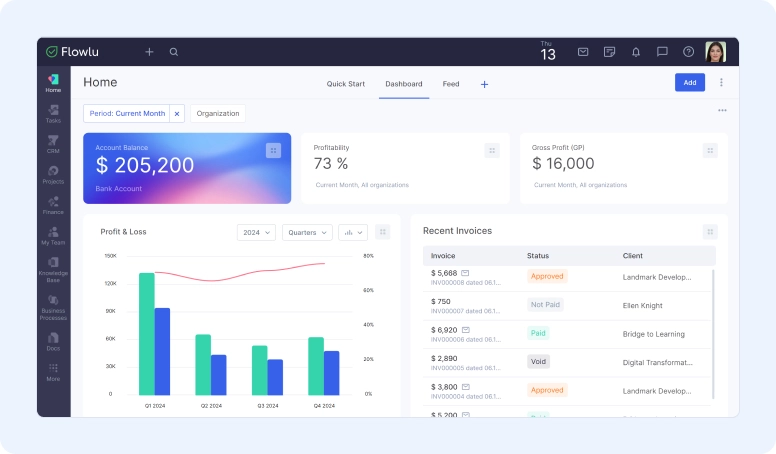

As a leading enterprise software and workflow management platform, Flowlu transforms the way businesses operate. It helps streamline work, improve collaboration, and increase productivity across all areas. A key feature of Flowlu is its easy-to-use automation workflow builder. This tool reduces the time spent on repetitive tasks. For example, marketing professionals can focus on more important tasks thanks to Flowlu’s help.
Flowlu also allows the creation of templates, which are great for automating work. It helps keep information organized and reduces errors when managing data and documents for you. Flowlu provides real-time reports and data for more informed decision-making. Furthermore, it easily integrates with various other tools such as Google Drive, Calendly, Mailchimp, Stripe, and more, increasing its value.
Flowlu is affordable. Its free plan for small users is cheaper than platforms like HubSpot’s Marketing Hub, which can cost significantly more. In short, Flowlu is an excellent choice for simplifying business tasks. It’s easy to use, adapts to your needs, and works well with other management tools, allowing businesses to improve and grow with it.
Key Features
- Manage opportunities, sales funnels, customer interactions, and email communication.
- Track progress, prioritize tasks, forecast revenue, plan costs, and monitor projects.
- Turn ideas into tasks, assign them to teammates, track completion, and analyze performance.
- Centralize financial records, visualize data with charts, and gain insights into spending.
- Building complex automation workflows to optimize internal processes.
- Send customized invoices quickly, automate billing, and enable online payments.
- Create internal and external knowledge bases for sharing information between employees and customers.
- Brainstorming and organizing ideas in one place.
Price
- Free Plan: $0/month
- Team Plan: $29/month
- Business Plan: $59/month
- Professional Plan: $119/month
- Corporate Plan: $199/month

2. Cflow
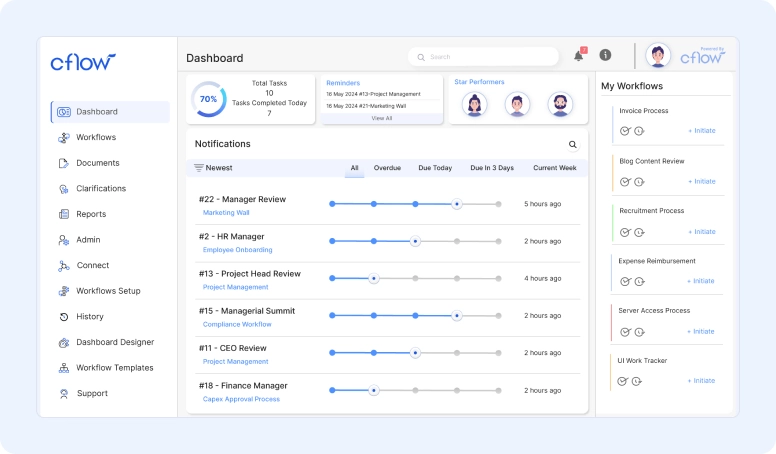
Cflow is a cloud-based platform useful for managing and automating business processes. It’s the top choice for those who don’t want to code workflows. Many large companies rely on Cflow for their workflow automation needs.
Cflow offers many excellent tools, including a visual workflow designer, easy task assignment, and alerts. It also allows for easy data and document management. You can track processes in real time and easily connect to other business tools. Cflow has special applications for common tasks such as invoice approval, cost management, and business travel requests. It can also integrate with over 1,000 business tools.
Professionals from many fields praise the impact of Cflow on their work. Cflow is the ideal choice for companies that want to simplify processes and increase productivity. It shows how adjusting workflow can save money, increase productivity, and improve customer service. Its cutting-edge tools make it perfect for leading change and outperforming rivals.
In short, Cflow is a revolutionary tool for companies that want to work more efficiently and please their customers. Its advanced features and user-friendly design make it essential for those who are serious about improving business methods.
Key Features
- Intuitive drag-and-drop interface for creating and customizing workflows.
- Automated task assignments, notifications, and real-time monitoring.
- Centralized storage and seamless collaboration on files and documents.
- Comprehensive reports and dashboards for process optimization.
- Seamless integration with over 1,000 business tools and applications.
Price
- Happy: $12/user/month
- Joy: $16/user/month
- Bliss: $22/user/month
3. ActiveBatch
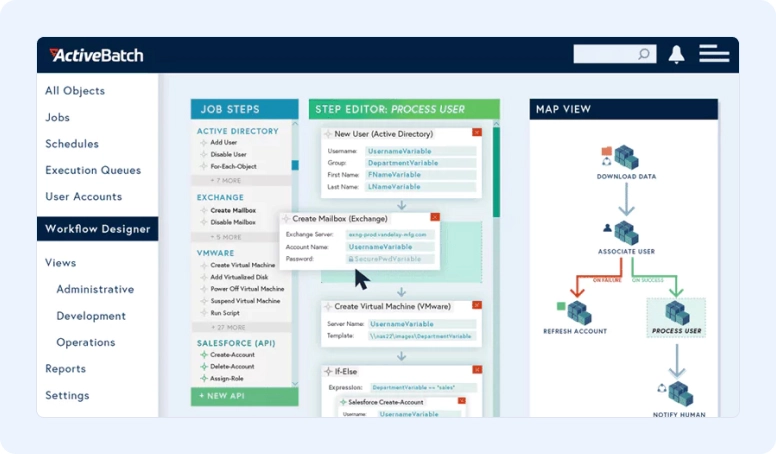
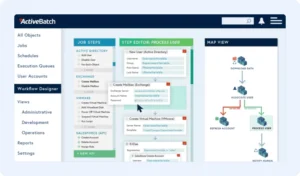
ActiveBatch is a top-tier automation tool that simplifies business operations. It’s designed to ensure smooth operations. It features many easy-to-use steps for creating work plans. You can use it even if you’re not a tech expert. It connects with many large applications and systems, streamlining workflows. ActiveBatch allows you to bring everything from IT tasks to everyday business tasks together in one easy-to-use place.
It uses smart technology to place work in the best locations, reducing wasted time. You can use emails, file transfers, or messaging to start working with it. Furthermore, it keeps you informed with updates on how the work is progressing. This helps ensure the work is done right the first time. The tool allows you to test your plans first, ensuring they are perfect. It’s also flexible with work schedules, adapting to your company’s timetable.
Companies love ActiveBatch because it makes work easier and faster. It’s great because there’s no need to write code; you just design the work with its tools. These tools can work with applications like Microsoft, HR software, and more. Even older tasks, like those in Windows, can work with it. And when something goes wrong, it knows how to fix it with tools like ServiceNow.
For secure file transfer, ActiveBatch offers the best technology. The work is performed with minimal human intervention. It can handle various types of tasks, both technical and routine. You can set schedules and work rules that always work well with your company’s timeline. It also integrates seamlessly with large cloud teams like Amazon and Microsoft, ensuring there’s always room for work to be done.
Key Features
- Unified platform for scheduling, monitoring, and managing workloads and business processes.
- It uses AI/ML for proactive problem detection and automated incident management.
- It provides robust analytics and reporting for visibility into process performance and compliance.
- It integrates with ERP, CRM, BI, and cloud platforms for comprehensive process automation.
- It supports growth with efficient resource utilization and high availability.
Price
- Contact us for pricing.
4. ClickUp
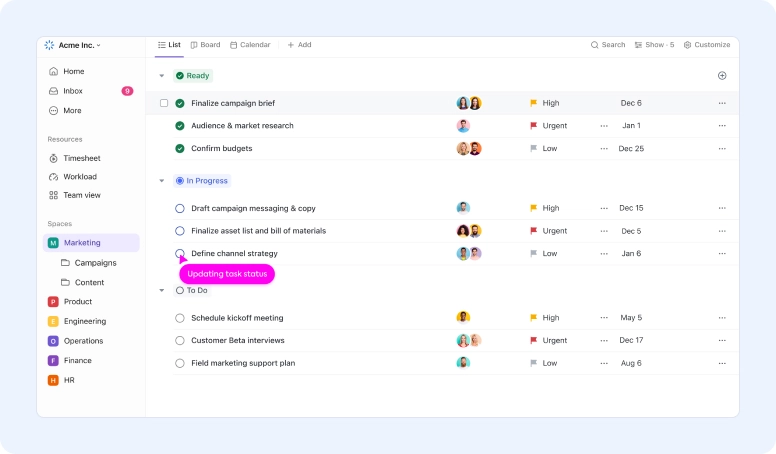
ClickUp is a top choice for businesses looking to simplify and streamline their work. It offers tools to make operations smoother, utilizing features like customizable templates and user-friendly design options. ClickUp helps businesses operate better than ever before.
ClickUp can accomplish a lot without requiring you to do everything. It can automatically handle recurring tasks. For example, it can remind you to complete tasks, notify you when they are due, and provide progress updates. This makes work faster, reduces errors, and allows teams to focus their energy on activities that can help the company grow.
ClickUp has pricing to fit any budget. There’s a $7 per user per month plan and a $12 business plan. There’s also a larger plan for those who need more, with customized pricing. This way, every business can get what it needs without overspending. ClickUp is a great help for businesses in today’s digital age. It offers everything needed to improve workflow, making businesses more efficient and poised for long-term success.
Resources
- Customizable automation templates to optimize common workflows.
- Intuitive drag-and-drop workflow builder for creating custom automations.
- Automated task assignments and reminders to keep teams on track.
- Seamless integrations with over 1,000 external business tools.
- Detailed reports and analyses to track the impact of automation.
Price
- Free Plan Forever
- Unlimited Plan: $7/month per user
- Business Plan: $12/month per user
- Business Plus plan: $19/month per user
- Corporate Plan: Contact us for pricing.
5. ProcessMaker
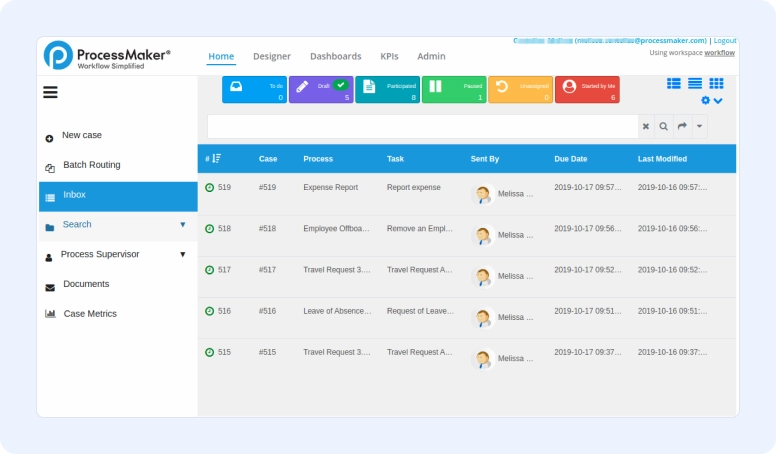
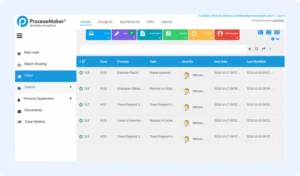
In the dynamic world of process automation, ProcessMaker stands out with its user-friendly features. It helps over 3 million people worldwide perform their work more efficiently. What sets ProcessMaker apart is its simple visual tool for creating workflows. Even if you’re not a tech expert, you can use it to design automated steps. This means less time spent on routine tasks and more productivity, while keeping up with the latest automation demands.
ProcessMaker offers even more than just easy workflow design. It allows you to easily create forms and keep important documents organized. Your team can stay aligned with automated tasks and updates. And you can track your progress at any time to make smarter decisions and improve your practices.
The best part is that ProcessMaker works well with other tools your company may already be using. This can save you time and money, making your business more efficient in just a few weeks. It’s all about making your work easier and better without a lot of complicated steps.
About two-thirds of companies are now looking to automate some large tasks. ProcessMaker is ready to help with its easy-to-use and comprehensive system. It’s a great choice for many industries, such as healthcare, finance, and education, where improving workflow could grow the market to $18.5 billion by 2030. In short, ProcessMaker transforms the way we handle daily work. It’s designed to meet our needs without requiring extensive IT skills.
Key Features
- An intuitive visual designer for creating and customizing processes.
- Automated task assignments and notifications to keep teams aligned.
- Advanced form builder and document management tool for data capture and storage.
- Real-time monitoring and reporting for data-driven decisions.
- Robust integration capabilities with enterprise systems for a cohesive automation solution.
Price
- Platform: $1,475/month for unlimited users
- Pro: Contact for pricing
- Enterprise+: Contact us for pricing.
6. Kissflow
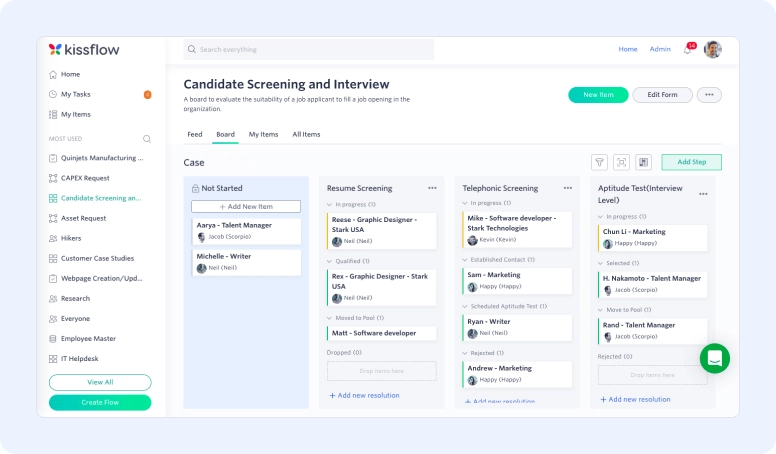

Kissflow is a tool that helps companies work better with automation. You can start using it in about 15 minutes. Many companies like it because it’s quick and easy to get started. It has a designer for creating workflows, manages task approval automatically, and has tools for teamwork. You can also track your performance and use it seamlessly with other applications.
To start using Kissflow, you first create forms. Then, you define how the work should flow, include who is involved, and test everything. Ensuring everyone knows how to use it is crucial. When everyone understands, Kissflow works best. It’s easy to use. Its design allows you to create well-structured processes, manage many different types of work, integrate with other applications, keep your information secure, and it’s accessible online. It also provides reports and tips on how to improve.
Kissflow Process shows live updates so you can see how the work is progressing. It allows you to control who sees what, which is important for large companies. This tool uses intelligent technology to create workflows without having to start from scratch each time. The form creation part in Kissflow offers many options. You can configure the work to follow different directions. It also connects well with others, such as MailChimp and Slack, making the work more fluid.
Using Kissflow and similar tools, companies can make significantly more money. The Annuitas group discovered that companies could increase their profits fourfold. It’s excellent for large companies that want to make their work more efficient without needing to program.
Key Features
- Empowering users to quickly turn ideas into reality.
- Automated, no-code workflows that perfectly fit your vision.
- Advanced case management to accelerate task completion.
- Accelerate low-code development to meet evolving business needs.
- Instant connections for effective integration with all essential systems.
- No-code connectors that simplify system linking for optimized operations.
- Visual presentation of data in a flexible interface that improves analysis.
Price
- Basic: $1,500/month
- Business: Contact us for pricing.
7. Bonitasoft
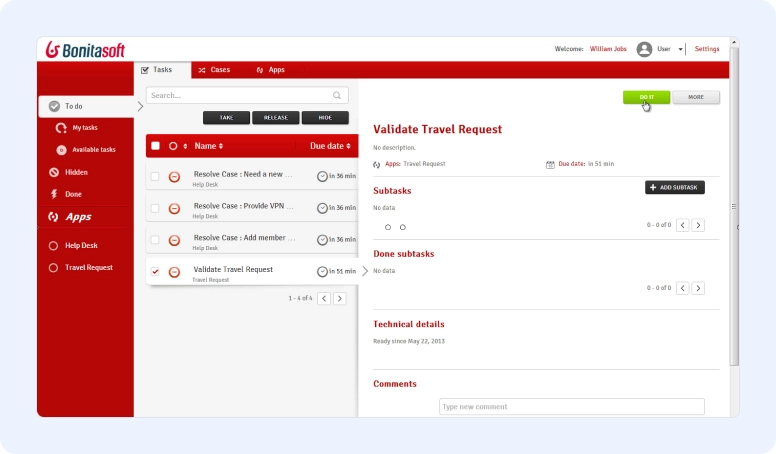
Bonitasoft is an amazing open-source tool for improving work in companies. Used by many experts and business leaders, it’s known for allowing easy workflow design and task automation. Furthermore, you can track everything in real time, and it can handle a larger workload as your company grows.
Many leading analysts have a positive opinion of this software, mentioning it extensively in their detailed reports. This tool has helped many large companies save time and money, improving the quality of their work. Renowned companies such as BMS and BBVA use it.
Bonitasoft users appreciate how it simplifies and improves their work. It’s easy to integrate with other tools and can be used quickly, something many find quite useful. This document discusses how automation can help companies become more efficient. It highlights the importance of using the same language for business and technology teams and the fundamental role of BPMN in this. It also emphasizes the importance of people, as both employees and customers play crucial roles in the effective management of processes.
Using automation software is an effective way to improve business. It reduces errors and makes work faster and more accurate. Furthermore, managing workflows with just a few people or teams is very useful. This makes processes more fluid and secure, increasing productivity. Bonitasoft is chosen by many due to its efficiency and the numerous success stories associated with it. It excels at making business operations smarter and more efficient, regardless of company size.
Key Features
- It accelerates process automation, reducing costs and increasing efficiency.
- It ensures seamless workflows between departments and corporate boundaries.
- Modernizes IT infrastructure for delivering complex applications.
- Loved by developers for its flexibility and extensibility.
- It offers customized support for developers, DevOps engineers, and executives.
- Recognized by Forrester and Gartner for digital process automation.
- It improves operational efficiency and customer and employee satisfaction.
Price
- Contact us for more pricing information.
8. Asana
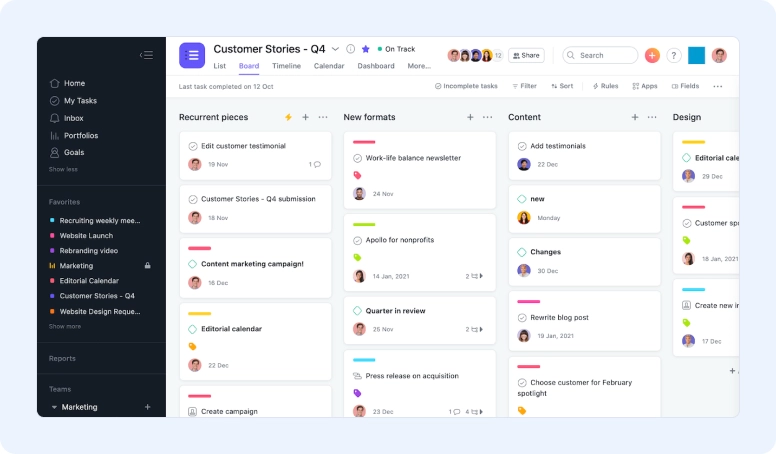
Asana is a work management and automation tool that helps companies organize tasks and workflows. It facilitates work by automating tasks, saving time, reducing errors, and ensuring smooth operation. It is an excellent solution for improving business efficiency, enabling the use of intelligent and automated work methods.
Asana has a wide range of features. It allows you to set up rules to automate tasks, send deadline reminders, and help keep all projects organized. Furthermore, it enables people to easily work together, even if they are not in the same location. In addition, it integrates with many other tools used daily by companies.
Asana goes beyond simple project management. It can automatically assign tasks, facilitating the continuity of teamwork. This type of automation can save considerable time each year, in addition to handling routine tasks and relieving employee stress. Asana also works well with other common programs, simplifying work for everyone.
One interesting aspect of Asana is its ability to manage multiple tasks. For example, it can organize who does what and when, as well as help share important updates via Slack. These features are geared towards making work more efficient. Asana is easy to use, yet extremely powerful, excelling in helping teams accomplish their tasks effectively.
Key Features
- It connects goals to teams and tracks progress in real time.
- Drive clarity, impact, and scalability with Asana’s AI.
- Ensures data security and compliance.
- It integrates easily with over 300 automation systems.
- Recognized as a leader by Gartner, Forrester, and IDC.
- It supports companies of all sizes, from startups to Fortune 100 companies.
Prices
- Personal: $0/month per user
- Starting price: $10.99/month per user
- Advanced: $24.99/month per user
9. Basecamp
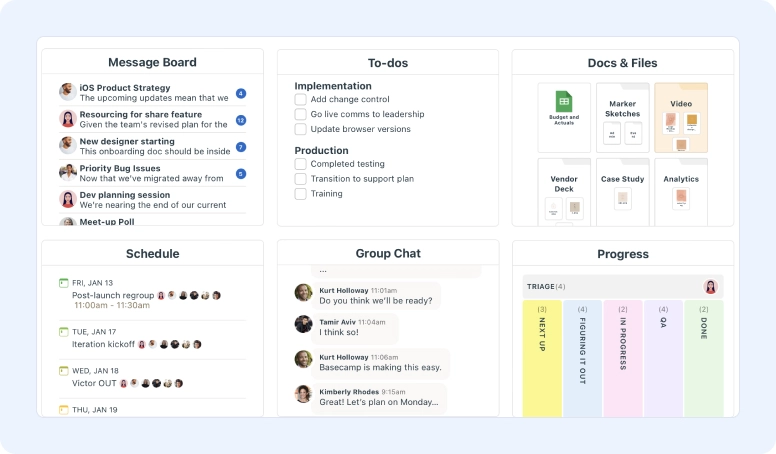

Basecamp is a powerful tool to manage projects and facilitate communication with your team. Helps companies work more efficiently and quickly. Basecamp can track tasks and remember deadlines, so you don’t forget important tasks or delays.
It also helps keep all documents in one place, making collaboration on projects easier. Chatting with your team in real time is also simple. Something interesting about Basecamp is that it works with many other tools. For example, Everhour helps you track time and works well with tools like Asana and Trello.
Zapier allows Basecamp to connect with more than 750 applications. This can make your work more productive and faster. Proposify facilitates the creation of proposals efficiently, linking them to projects. Ganttify and To-do Helpers are also part of Basecamp. Ganttify helps with project planning, and To-do Helpers facilitate task management.
More tools work with Basecamp. EvantoDesk converts emails into tasks. Easy Insight helps you understand information better. In today’s world, automation is key to staying up to date. Basecamp’s many features and connections are a great help. They allow companies to work smarter and faster, remaining competitive.
Basecamp can improve your workflow using smart tools. Bring people together and make work more efficient. No matter the size of your company, Basecamp can improve the way you do business. It makes project management easier and makes your equipment more efficient.
Key Features
- Simplified project tracking with Card Table, a unique version of Kanban.
- Comprehensive overview of multiple projects with Mission Control.
- Centralized tools for chat, messages, and tasks, ensuring clear communication.
- Transparent and reliable with 24 years of profitability and zero losses.
- Integration of several tools such as Chat, Lineup, To-dos, and Docs & Files for collaboration without interruptions.
- Trusted by more than 75,000 organizations around the world for its effectiveness.
Price
- Basic: $15/user per month
- Pro: Unlimited solo users $299/month
10. Microsoft Power Automate
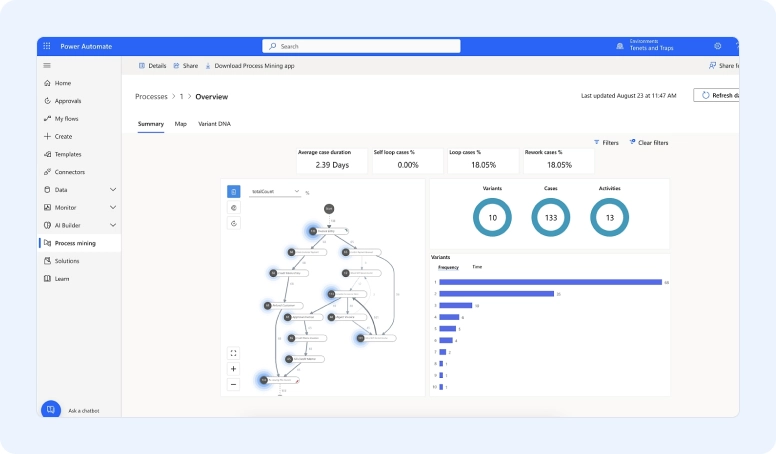
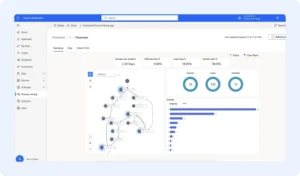
Microsoft Power Automate, formerly known as Microsoft Flow, is a cutting-edge automation management software for handling business tasks. It’s cloud-based and easy to use. It features intelligent technology, works well with many programs, and provides excellent data feedback. A key feature of Power Automate is the ease of creating workflows without code. Furthermore, it excels at managing tasks and approvals, with deep integrations with Microsoft 365 and other essential applications.
It allows companies to automate many tasks, from customer service and financial operations to managing HR and IT needs. It has many ready-to-use workflows and allows you to create your own. This makes it ideal for reducing repetitive tasks, correcting errors, and increasing productivity. It is also robust with data and can generate all types of documents.
It’s useful for common tasks like invoicing, expense tracking, and onboarding new employees. Because it’s cloud-based and works on mobile devices, people can use it wherever they are. This makes collaboration easier and faster. As more people want to work independently with less intervention, Microsoft Power Automate is one of the best options available.
It has the right management tools, integrates well with many other programs, and is simple to learn. This puts it at the forefront of making work smoother and more innovative. To get the most out of Microsoft Power Automate, companies should communicate, train, and pursue continuous improvement. By making the most of its capabilities and optimizing processes, companies can save a lot of time and money. They can also allow their employees to focus on tasks that add more value.
Key Features
- Intuitive, no-code workflow designer
- Automated task assignments and approvals
- Seamless integration with Microsoft 365 and other business applications.
- Advanced data processing and document generation.
- Extensive library of pre-built automation templates
- Reducing errors and increasing accuracy.
Prices
- Power Automate Premium: $15 per user/month
- Power Automate Process: $150 per bot/month
Benefits of Business Process Automation
Using business process automation (BPA) brings many benefits to companies. It helps them work better and grow. Automation software increases productivity, ensures compliance with regulations, and saves money. BPA first makes companies run faster and better. It can reduce up to 80% of the time spent on normal tasks, allowing employees to focus on more essential activities. Efficiency can increase by 40% to 75% in different tasks, reducing errors and making work easier.
Automation software also generates significant savings. It can reduce costs by 30% to 50% by eliminating lengthy manual tasks. Ensuring processes are correct can save, on average, around $12 million annually. Customer satisfaction also improves with automation software, potentially increasing by 70%. Workflows become more efficient, and fewer errors occur. Companies observe large drops in errors – up to 90%. This means customers receive more accurate and consistent work.
This helps companies generate more revenue. With automation, they can earn 10% to 30% more. They can handle much more work without spending much more on labor. But the benefits don’t stop there. Automation software also simplifies processes, offers more control, and speeds up decision-making. It provides real-time data and tips for better choices. This is especially important for jobs that need to comply with regulations.
Conclusion
Business process automation helps companies of all sizes operate better. It makes work more fluid, increases productivity, and facilitates growth. With the right automation management tools, such as Flowlu, companies can improve their processes, increase customer satisfaction, and stand out from the competition. As more companies adopt automation software, those that adapt quickly will have a better chance of future success.
This article has shown many benefits of process automation. It can facilitate HR work, improve production and marketing, and much more. Flowlu is excellent for any company looking to automate tasks and improve efficiency. It stands out for its user-friendly interface, customizable workflows, and seamless integrations, making it the best choice for companies of all sizes.
Transform your business operations today – experience the power of automation with10 automation tools. Sign up now and start optimizing your workflows to increase productivity and growth.
About the Author